



Shopify has no “parent collection” setting. Since July 2026, though, you can add one collection as a source of another, so the parent page lists everything in its children. That solves the products. It doesn’t create the links between those pages, and it doesn’t tell Google or AI tools which page sits under which.
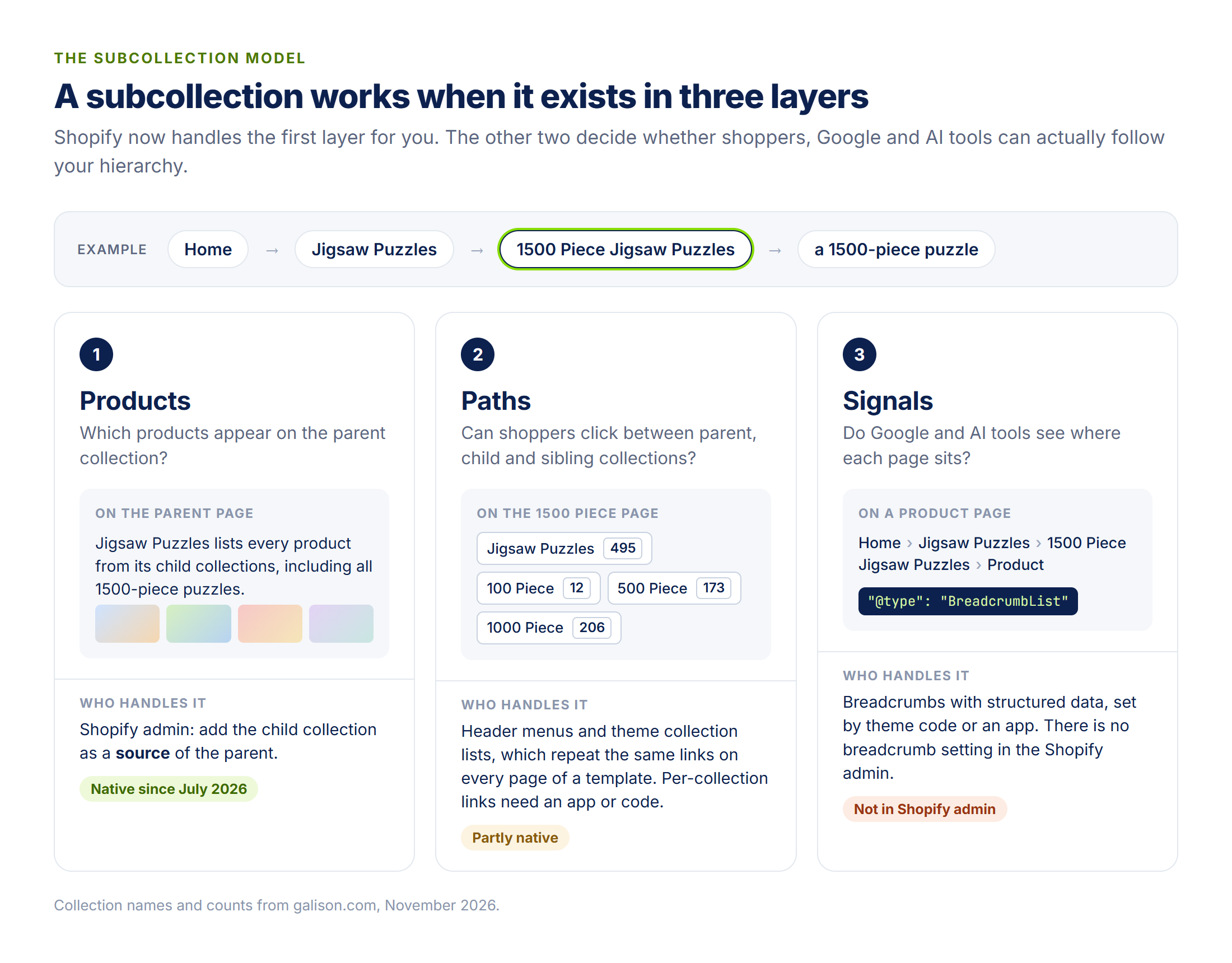
A subcollection works when it exists in three layers:
- Products. The parent collection includes the subcollection’s products. Shopify admin, built in.
- Paths. Shoppers can click from the parent down to the subcollection, back up, and across to its siblings. Menus and theme sections, or per-collection links.
- Signals. A breadcrumb on every collection and product page states where the page sits, with matching BreadcrumbList structured data. Theme code or an app.
Galison, a puzzle and gift brand, organizes around 500 jigsaw puzzles by piece count, theme and artist.
Why a subcollection is three jobs, not one
When merchants ask how to add subcollections in Shopify, they usually mean one of three things:
| What the merchant says | Layer | What has to happen |
|---|---|---|
| “Jigsaw Puzzles should show everything in 500 Piece and 1000 Piece.” | Products | The parent collection includes the child collections’ products. |
| “Shoppers on Jigsaw Puzzles should be able to click into 500 Piece, and back.” | Paths | Each page links to its parent, its children and its siblings. |
| “Google should understand that 500 Piece belongs under Jigsaw Puzzles.” | Signals | Breadcrumbs and structured data state the hierarchy on every page. |
Most subcollection tutorials cover only the second job, usually with a dropdown menu. That leaves the other two open: product pages with no record of where they belong, and subcollection pages a shopper can only reach if they open the menu. Each layer needs its own fix.
Layer 1: Products — make the parent include its subcollections
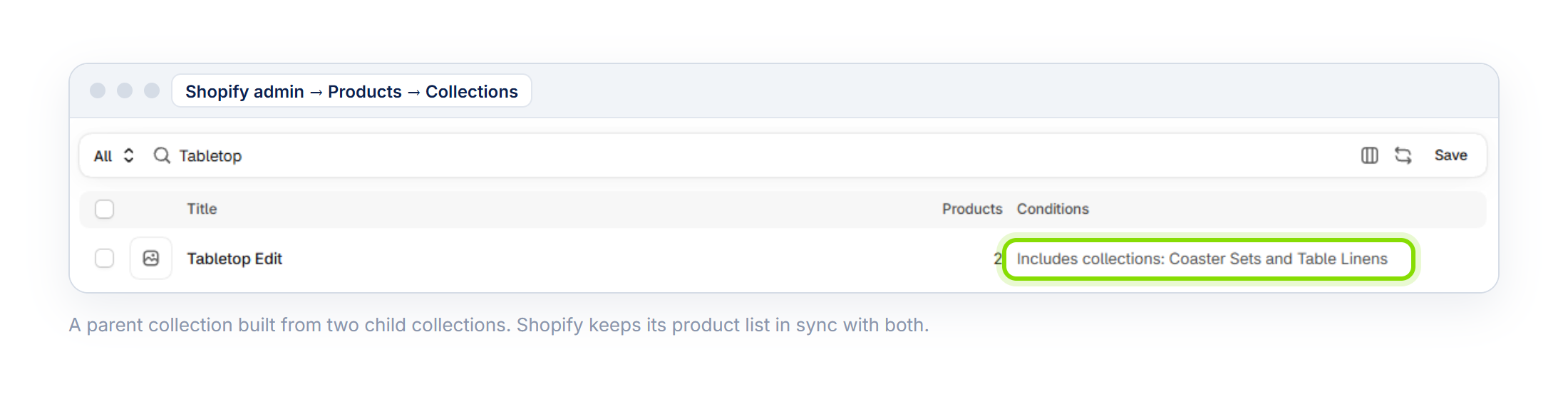
Shopify’s July 16, 2026 collections update lets you build a collection from several sources at once: automated conditions, hand-picked products, exclusions and other collections. When a source collection changes, the parent stays in sync.
To set it up:
- In Shopify admin, go to Products → Collections and open the parent collection (or create it).
- In the collection’s sources, add each subcollection.
- Save, then open the parent collection on your storefront.
What we saw when we tested it. On a Risify test store with a draft copy of Dawn 14.0.0 (November 19, 2026), we added a second subcollection to a parent that already had one:
| On the parent collection page | Before | After adding the second subcollection |
|---|---|---|
| Products listed | 1 | 2 |
| Header menu link | First subcollection only | First subcollection only |
| Collection card on the page | First subcollection only | First subcollection only |
Adding a product to a subcollection later updated the parent’s product list automatically. The menu and the theme’s collection card didn’t change. *Collection sources control what’s in a collection, not how shoppers get to it.* That’s what the next two layers are for.
Layer 2: Paths — let shoppers move up, down and across
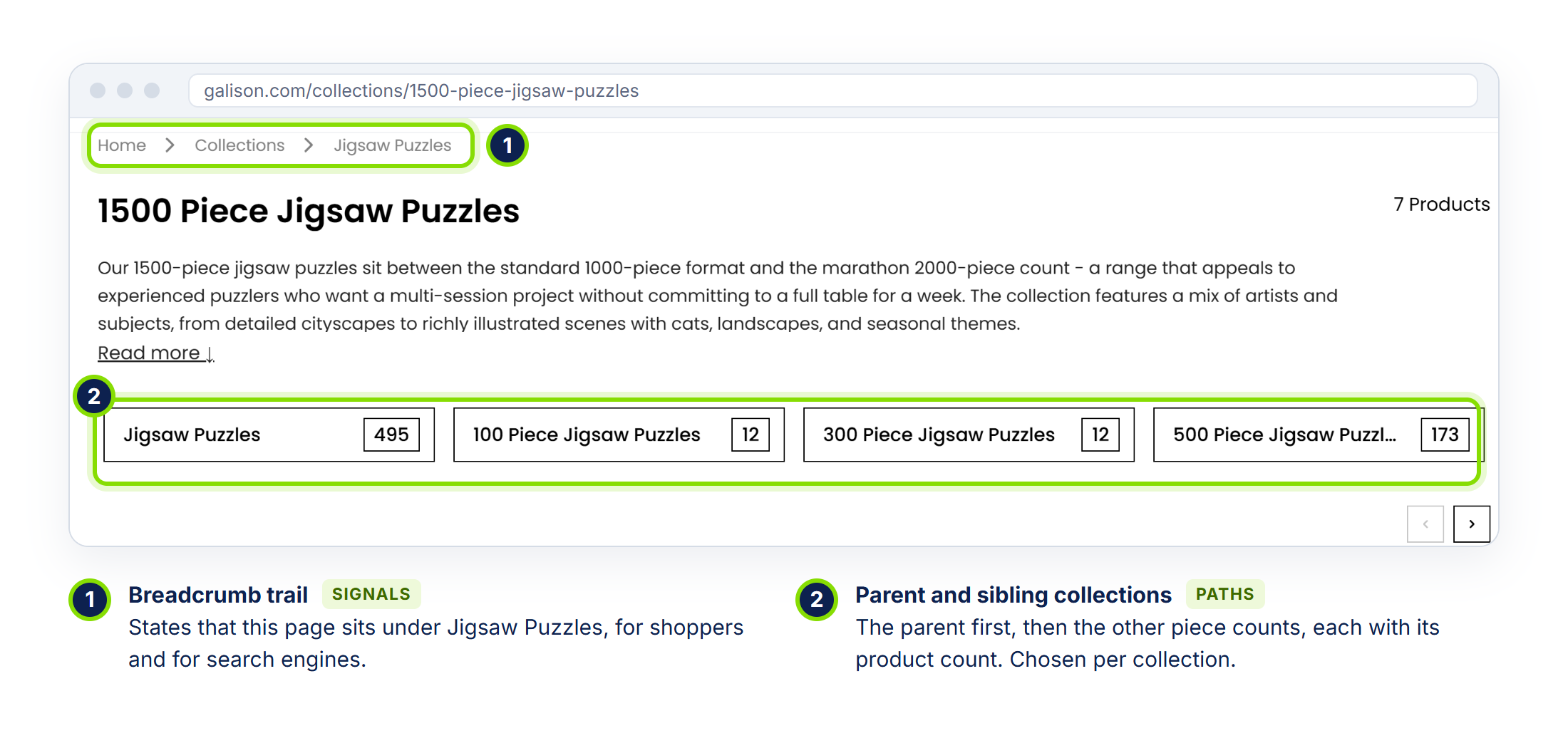
A shopper who lands on 1500 Piece Jigsaw Puzzles from a Google search never opened your header menu. The page itself has to answer two questions: what’s above this, and what else is next to it?
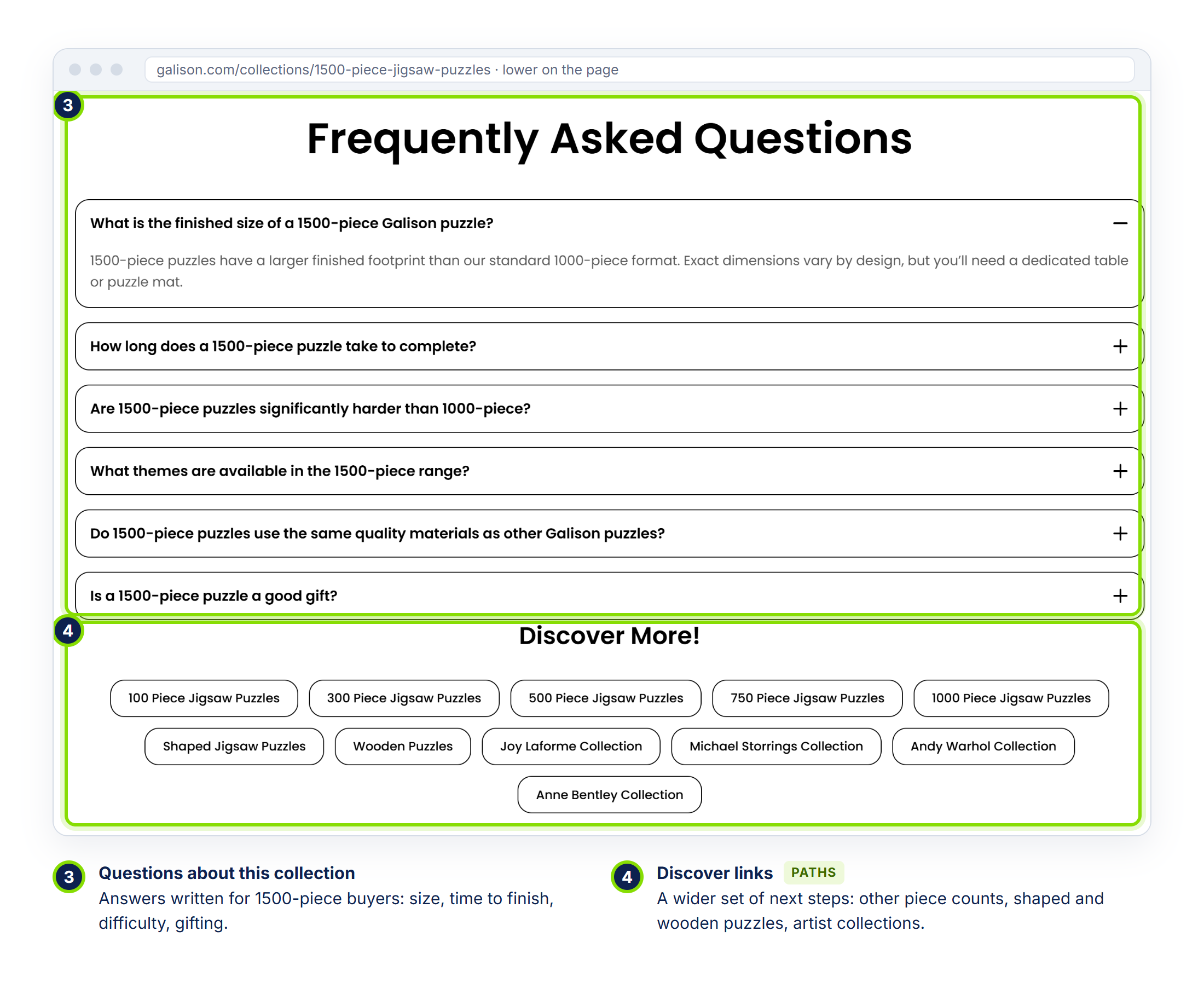
Galison’s page answers both right under the description. The parent comes first (Jigsaw Puzzles, 495 products), followed by the other piece counts, each with its own product count.
Further down, after the collection’s own FAQ, a second block offers wider next steps: shaped and wooden puzzles, and artist collections.
Your options for paths:
| Option | Where the links appear | Best for | Limit |
|---|---|---|---|
| Header menu (Content → Menus) | Every page, inside the menu | Top-level categories | Hidden until opened; hard to use beyond two levels |
| Theme section, e.g. Dawn’s Collection list | Every collection that uses the template | A fixed set of links | The same links appear on every page of that template, unless you create and assign more templates |
| Per-collection links (Risify Similar and Discover, or metafields plus custom theme code) | Only the page you set them for | Parent, child and sibling links that differ from page to page | Needs an app or a developer |
A rule of thumb: every subcollection should link to its parent and to its closest siblings, and every parent should link to all of its subcollections, on the page itself and not only in the menu. That’s what lets a shopper, or a search engine following links, move through the catalog from any entry point.
Layer 3: Signals — state the hierarchy on every page
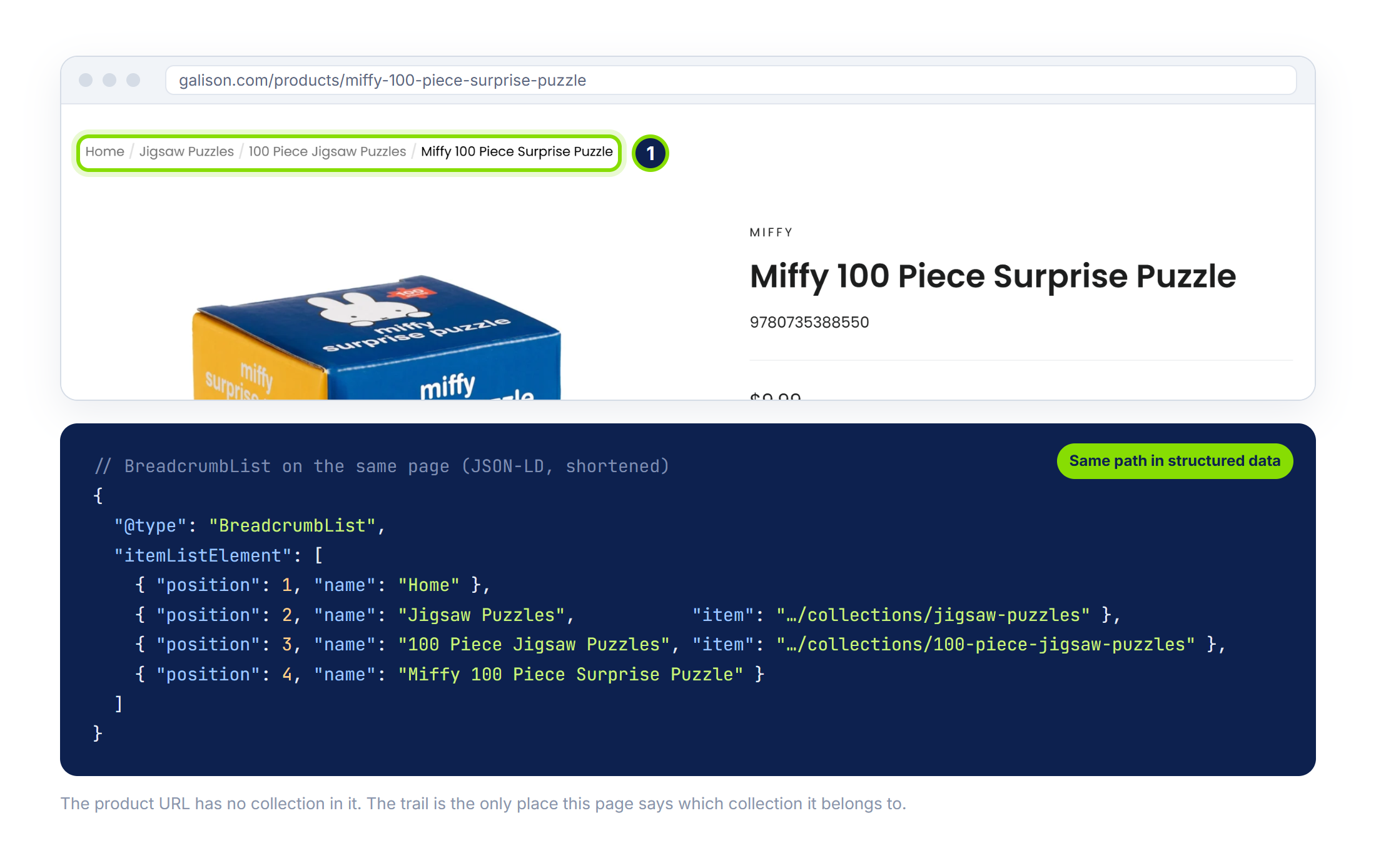
Shopify product URLs don’t include collections. Galison’s Miffy puzzle lives at /products/miffy-100-piece-surprise-puzzle, whether the shopper arrives from 100 Piece Jigsaw Puzzles, from search or from a gift guide.
The URL doesn’t say where the product belongs. The breadcrumb does.
When breadcrumbs are left to the theme, two problems are common:
- No collection at all. Many themes either have no breadcrumbs or build them from the page the shopper came from. Opened directly, which is how search engines and most AI tools open it, the product shows Home › Product or nothing.
- The wrong parent. Say a puzzle sits in 100 Piece Jigsaw Puzzles, Kids & Family, Gifts Under $25 and New Arrivals. A trail through New Arrivals stops making sense the day the product is no longer new.
The fix is to choose one primary path for each collection and each product, show it as a visible breadcrumb, and output the same path as BreadcrumbList structured data. Google uses this markup to understand where a page sits in your site. On Galison’s product page, the visible trail and the structured data match item for item.
For a deeper look at choosing primary paths, see How to Fix Breadcrumbs in Shopify.
Setting up all three layers across a whole catalog
On a store with ten collections, you can set all three layers by hand in an afternoon. Galison has 107. At that size the hard part isn’t clicking, it’s deciding: which parent does each collection belong to, and which siblings should each page offer?
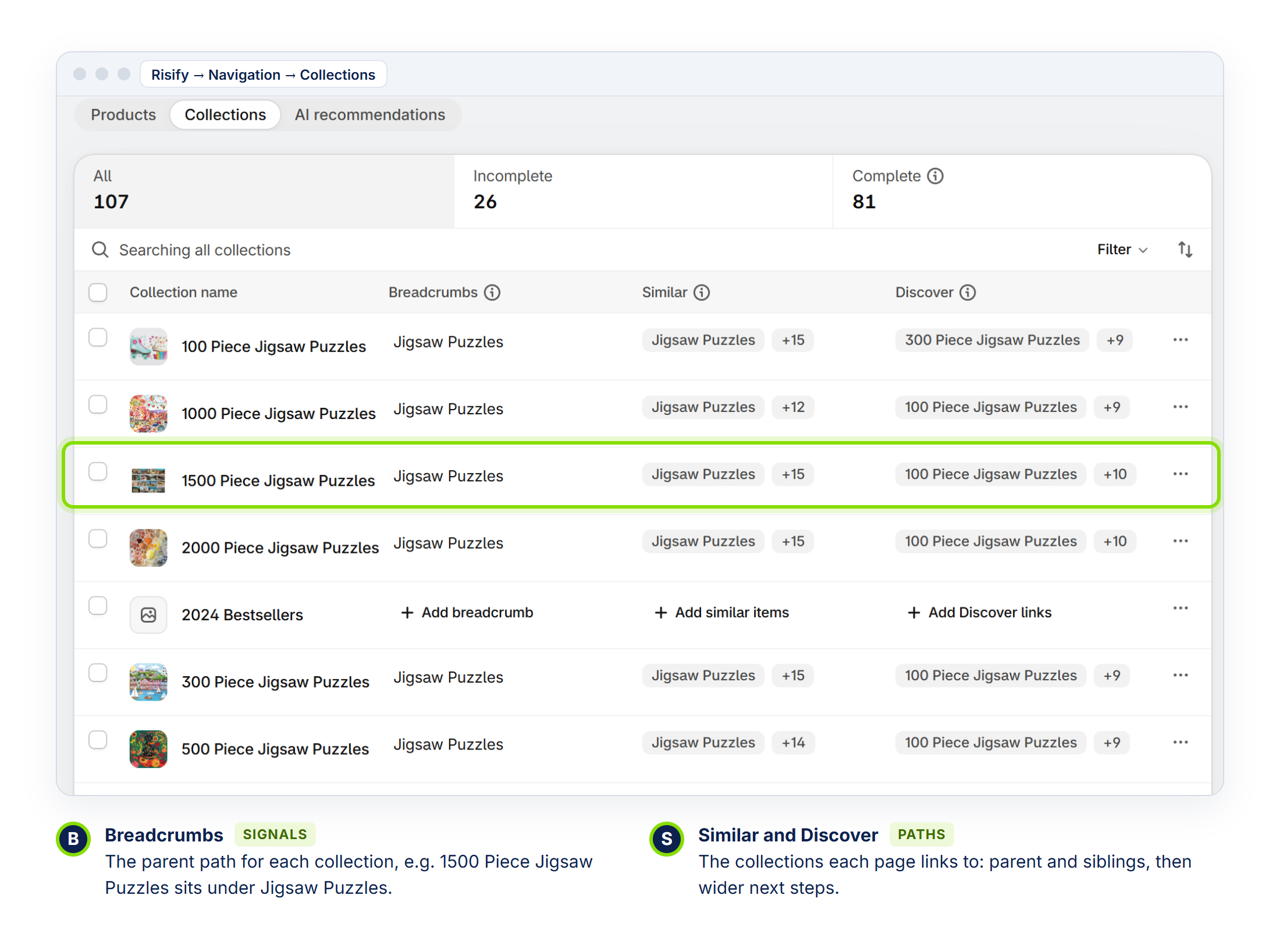
This is the work Risify is built for. In Risify → Navigation → Collections, each collection shows three columns: Breadcrumbs (signals), Similar and Discover (paths). Collections with a missing parent or no links stand out, and the tabs at the top count how many are still incomplete.
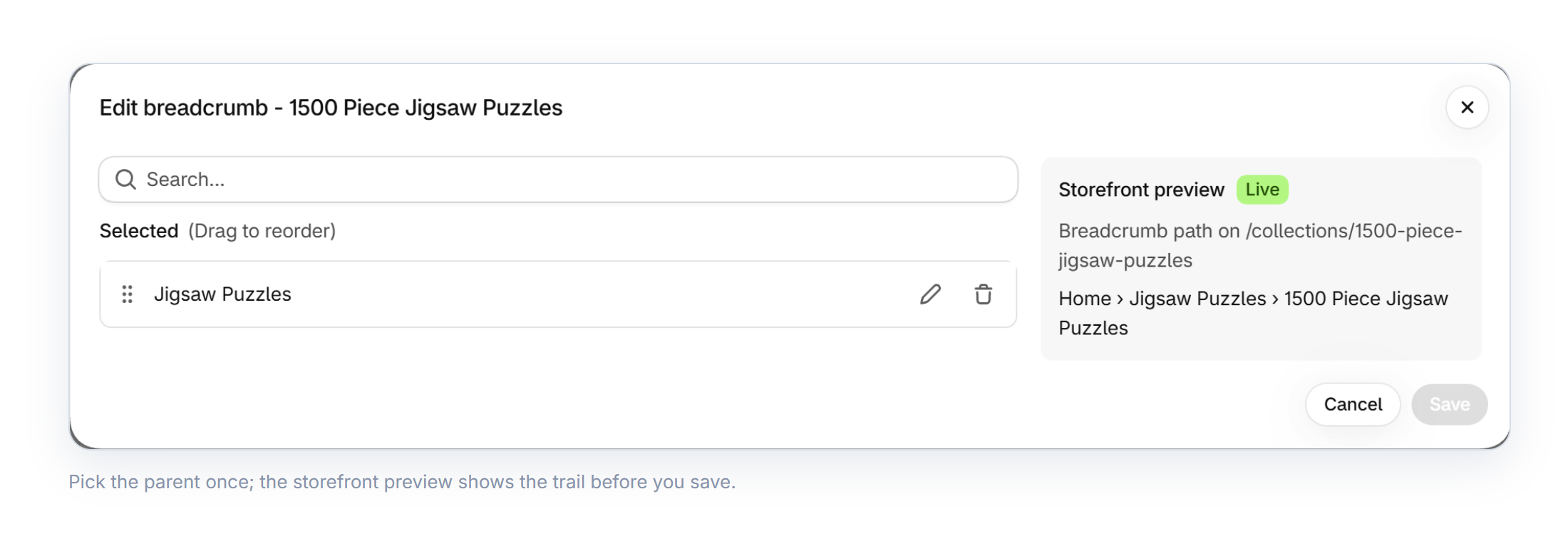
Setting a breadcrumb takes one dialog. Choose the parent, and the storefront preview shows the trail before you save.
For large catalogs, AI recommendations propose a breadcrumb parent, Similar links and Discover links for every collection, grouped by catalog area. You review each row and accept or dismiss it. Nothing changes on your store until you accept.
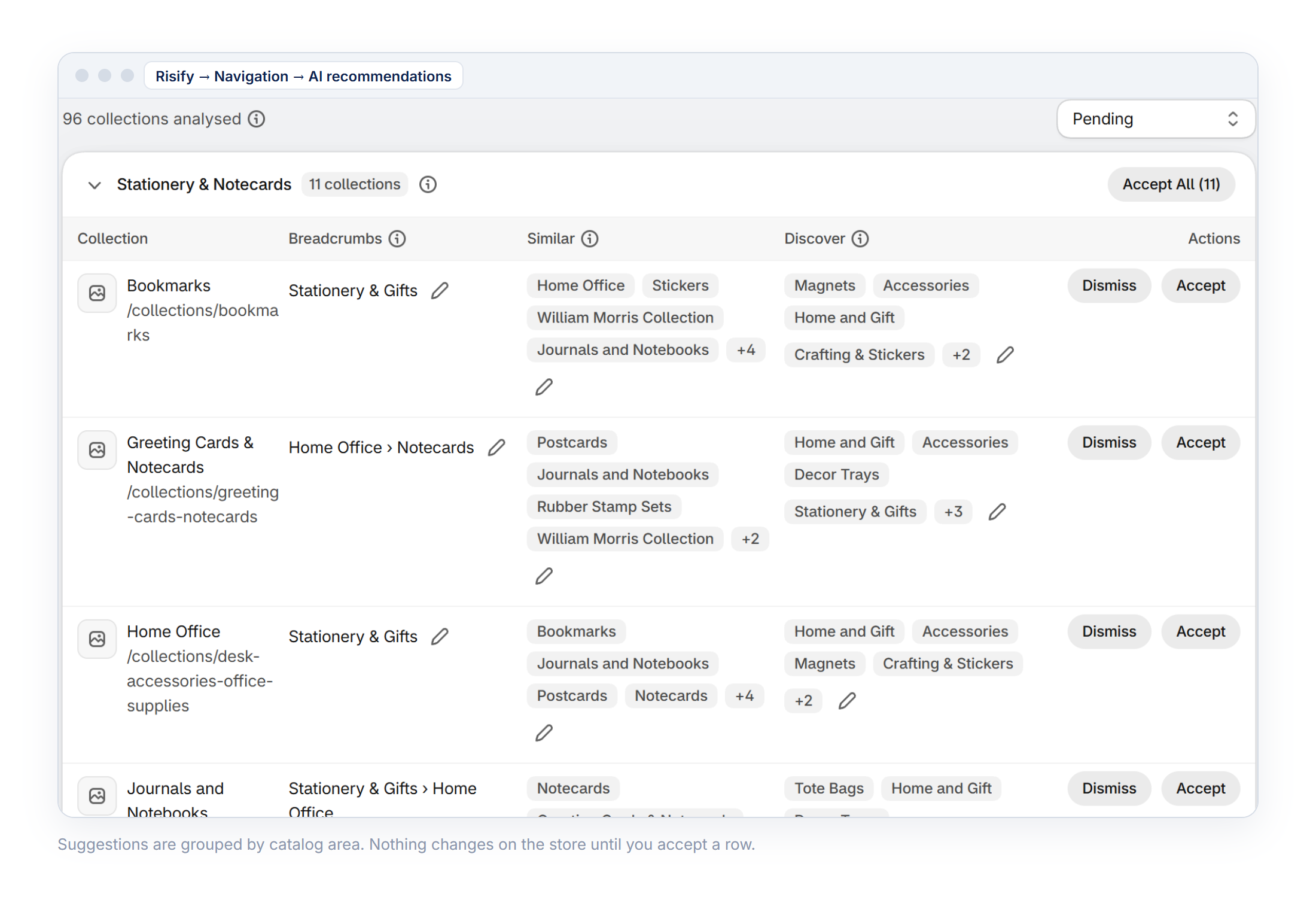
The theme side is a one-time setup: add Risify’s Breadcrumbs, Similar and Discover blocks to your collection and product templates in the theme editor, once per template. After that, every assignment shows on every page that uses those templates. See the Navigation setup guide.
Checklist: does your subcollection actually work?
Open one parent collection, one subcollection and one product directly, in a private window, without going through your menu. Then check:
- Products: the parent collection lists the subcollection’s products.
- Paths: the parent page links to each of its subcollections, outside the header menu.
- Paths: the subcollection links back to its parent and across to its closest siblings.
- Signals: the subcollection shows a breadcrumb that includes its parent.
- Signals: the product shows a breadcrumb through a permanent collection, not a sale or seasonal one.
- Signals: the page source contains BreadcrumbList structured data with the same items as the visible trail.
To check your own store, enter your URL in the free Shopify Navigation & Page Checker. It reads up to 15 pages, starting from your homepage, and runs 16 checks across breadcrumbs, collection links, dead-end pages, collection content and FAQs. No email needed.