



Shopify’s built-in SEO is enough to get a store indexed, and for a very small store it can be enough to start. It is not enough for a store that wants to compete for category searches or be recommended by AI tools, because Shopify leaves gaps in catalog structure, breadcrumbs, structured data and on-page answers.
The good news is that you can close those gaps yourself. You do not need an agency or a developer. This guide shows what Shopify covers, where it stops, and how to tell whether your store needs more.
A note on who is writing: Risify is our Shopify app, and it is built to close these gaps. We explain where it fits near the end.
Key takeaways
- Shopify handles the technical basics well: sitemaps, canonical tags, HTTPS, mobile-friendly themes and meta fields.
- Shopify has no collection hierarchy, and its default breadcrumbs depend on how a visitor arrived.
- Structured data on Shopify depends on your theme, and there is no built-in FAQ feature for storefront pages.
- Shopify sends product data to some AI platforms, but it does not show you whether AI tools mention your store.
- A merchant or a small team can close these gaps with the right app, without code.
What does Shopify do well for SEO?
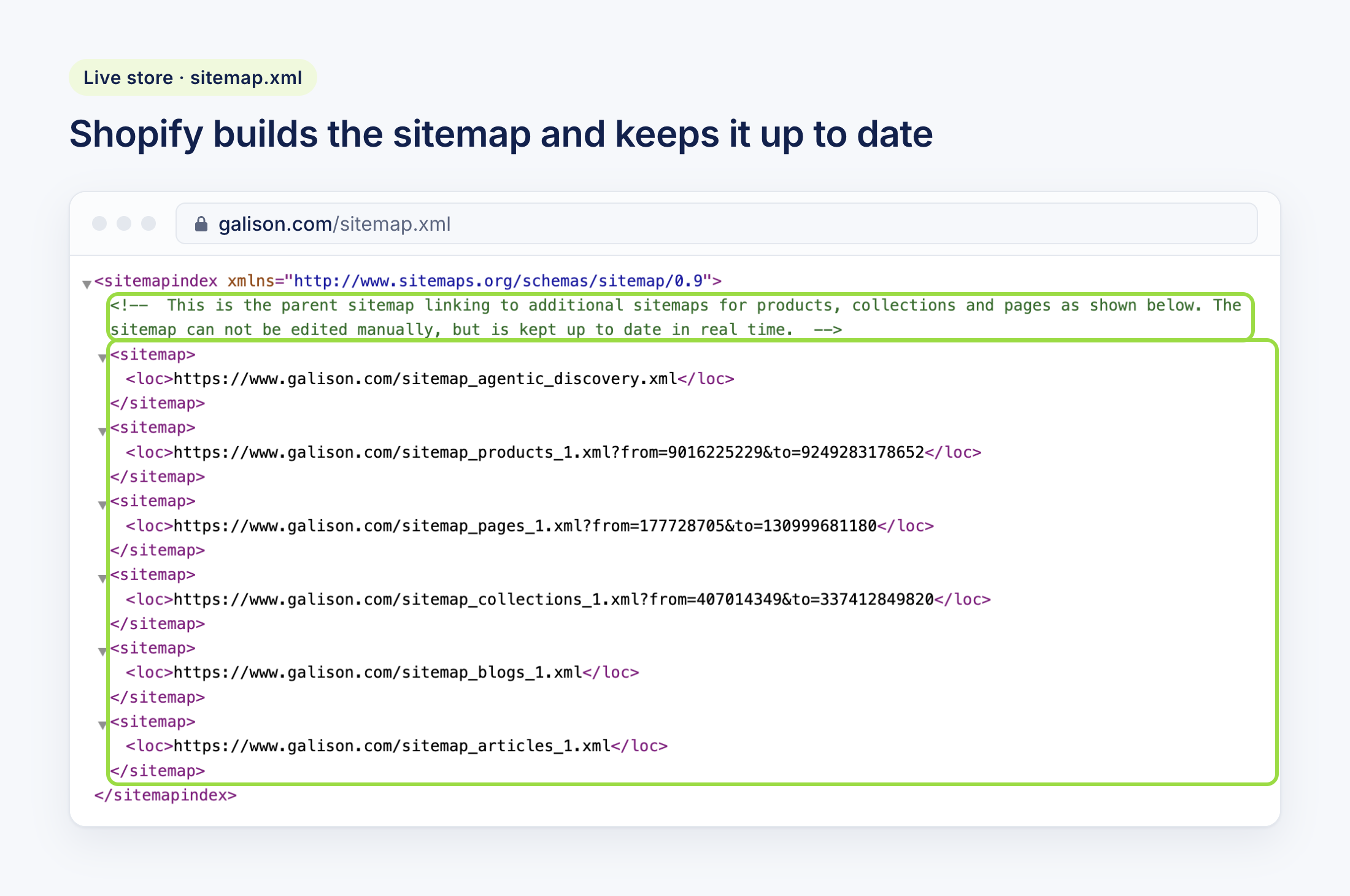
Shopify gives you a solid technical baseline with no setup. Many platforms need manual work to reach the same starting point.
- Sitemaps. Shopify creates and updates your sitemap automatically as you add or remove products, collections, pages and posts.
- Canonical tags. When a product appears in several collections, Shopify points search engines to one primary URL, which prevents duplicate content problems.
- HTTPS. Every store has a secure connection by default.
- Mobile-friendly themes. Shopify themes are built to work on phones.
- Meta fields. Every product, collection, page and post has a field for a title tag and a meta description.
- Redirects. Shopify lets you create URL redirects when a page moves.
Shopify also does some work for AI search. It sends your product data to partnered AI platforms through its own product catalog, it offers a free Knowledge Base app for store policies and FAQs, and it now provides an llms.txt file for stores automatically. We cover this channel in Shopify Knowledge Base vs Structured Data for AI.
So if your question is “is Shopify good for SEO out of the box?”, the fair answer is yes, for the basics.
What does Shopify not do for SEO?
Shopify’s gaps are in the areas that tell search engines and AI tools how your store is organized and what your pages answer. Here are the six that matter most.
1. Collections have no hierarchy
Shopify stores every collection at the same level. You can nest “Sofas” under “Furniture” in your menu, but in Shopify’s data they are two unrelated collections. Search engines look at the underlying structure, so they see separate pages with no defined relationship.
For a store with a handful of collections, this hardly matters. For a store with dozens or hundreds, it means search engines and AI tools cannot see how your catalog fits together.
2. Breadcrumbs depend on the visitor’s path
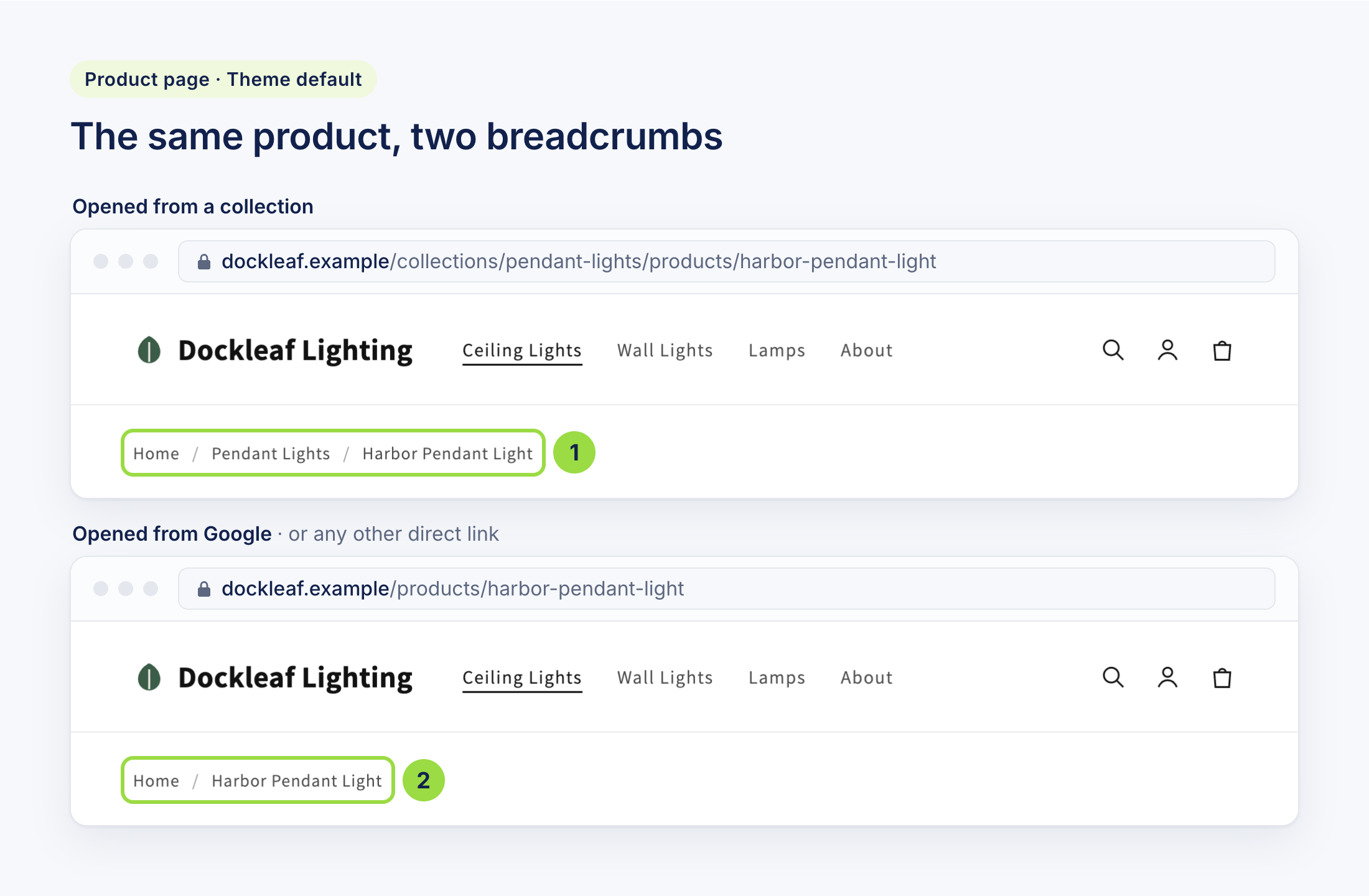
Shopify’s default breadcrumb reads where the visitor came from. Arrive from a collection and you may see that collection in the breadcrumb. Arrive from Google and the breadcrumb is often incomplete or missing.
That is a problem for shoppers and for search engines, which use breadcrumbs to understand where a page sits. Shopify Breadcrumbs: How to Check and Fix shows how to test your own store.
3. Structured data depends on your theme
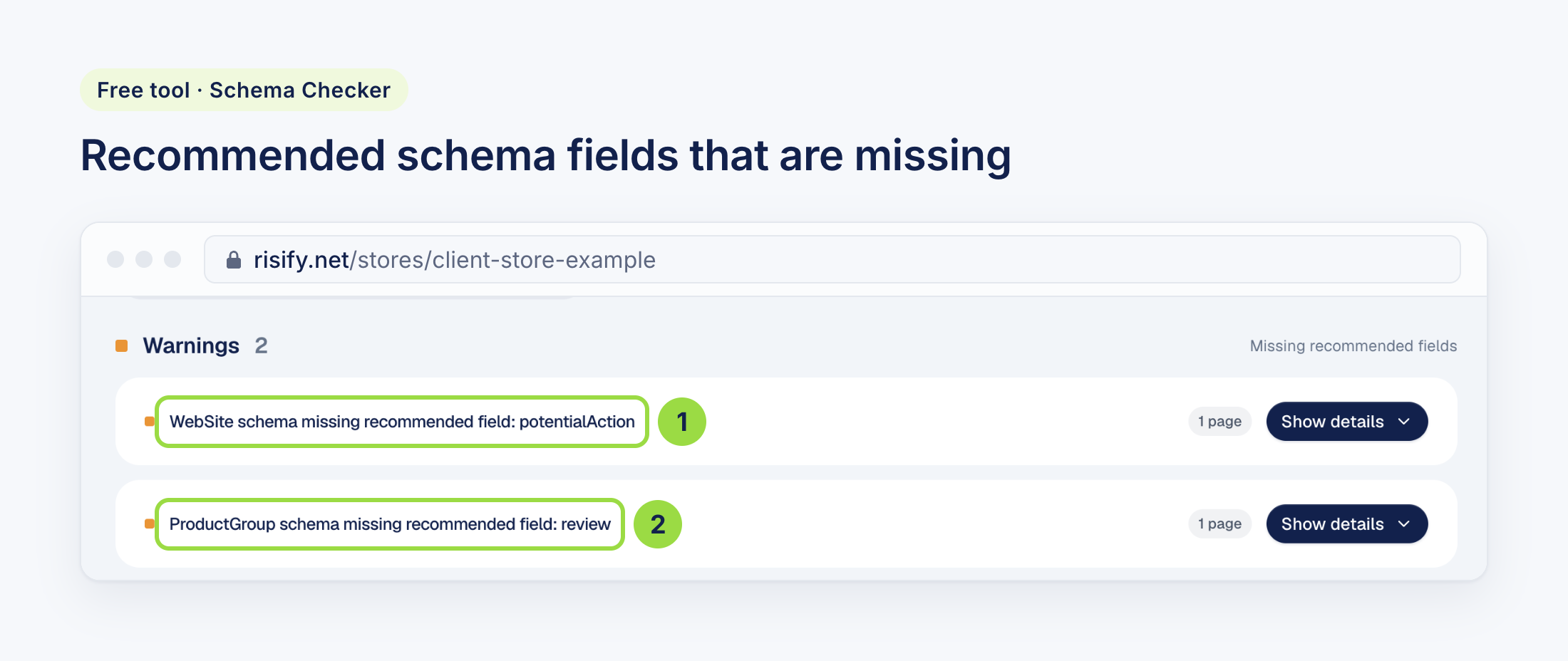
Shopify does not manage structured data for you. Your theme adds whatever its developer chose to include, usually basic Product schema. Fields that Google looks for, such as shipping and return details, are often missing. Breadcrumb, FAQ and Organization schema are often absent.
When you add a reviews app or another SEO app, you can also end up with two sets of schema on one page. Our Shopify schema markup guide explains what complete schema looks like.
4. No FAQs on product and collection pages
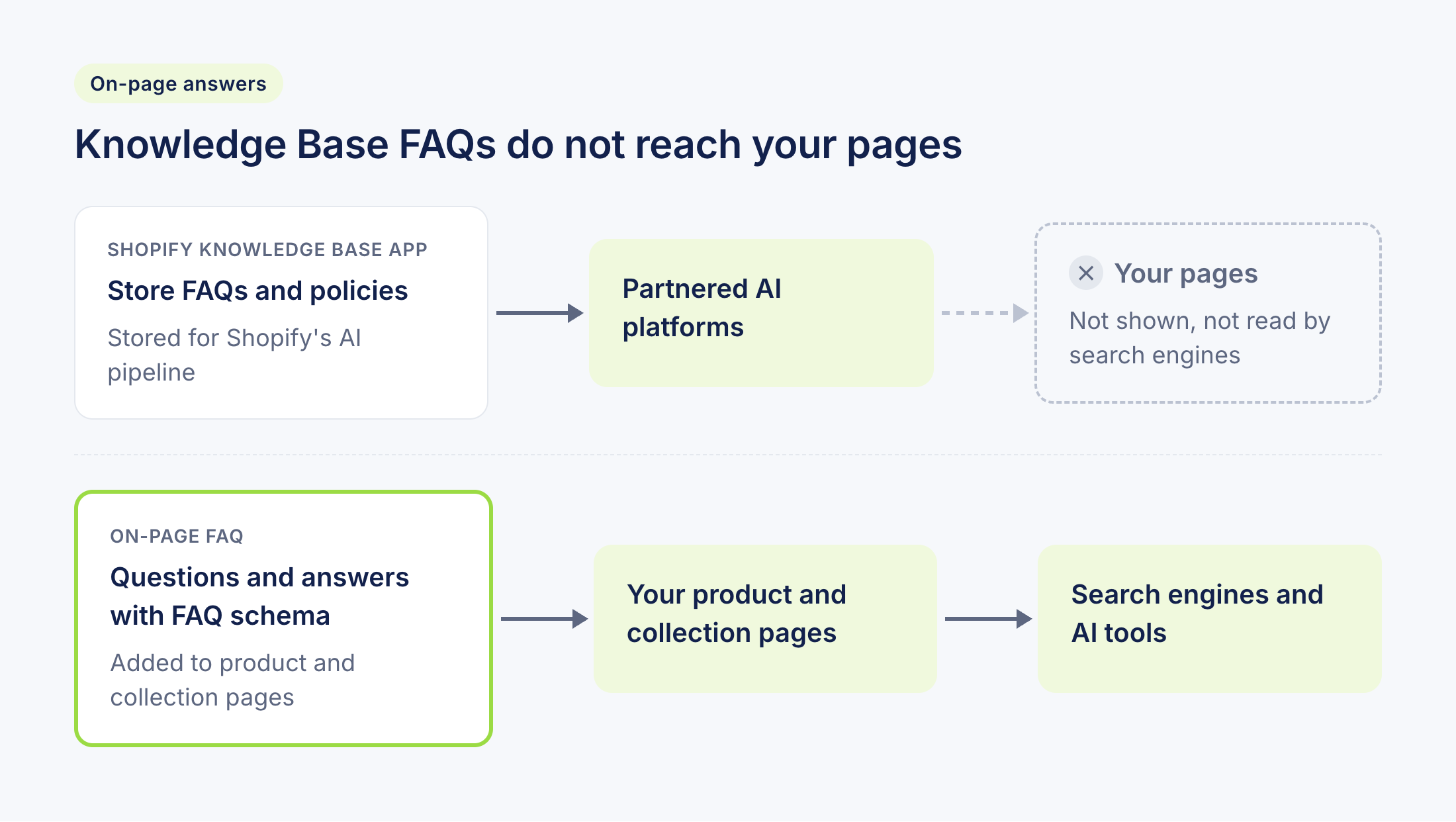
Shopify has no built-in way to add questions and answers to storefront pages with FAQ schema. The Knowledge Base app stores FAQs for Shopify’s AI pipeline, but those do not appear on your pages and search engines do not read them.
On-page FAQs matter more now, because AI tools look for pages that answer the questions shoppers ask.
5. No way to see problems across the store
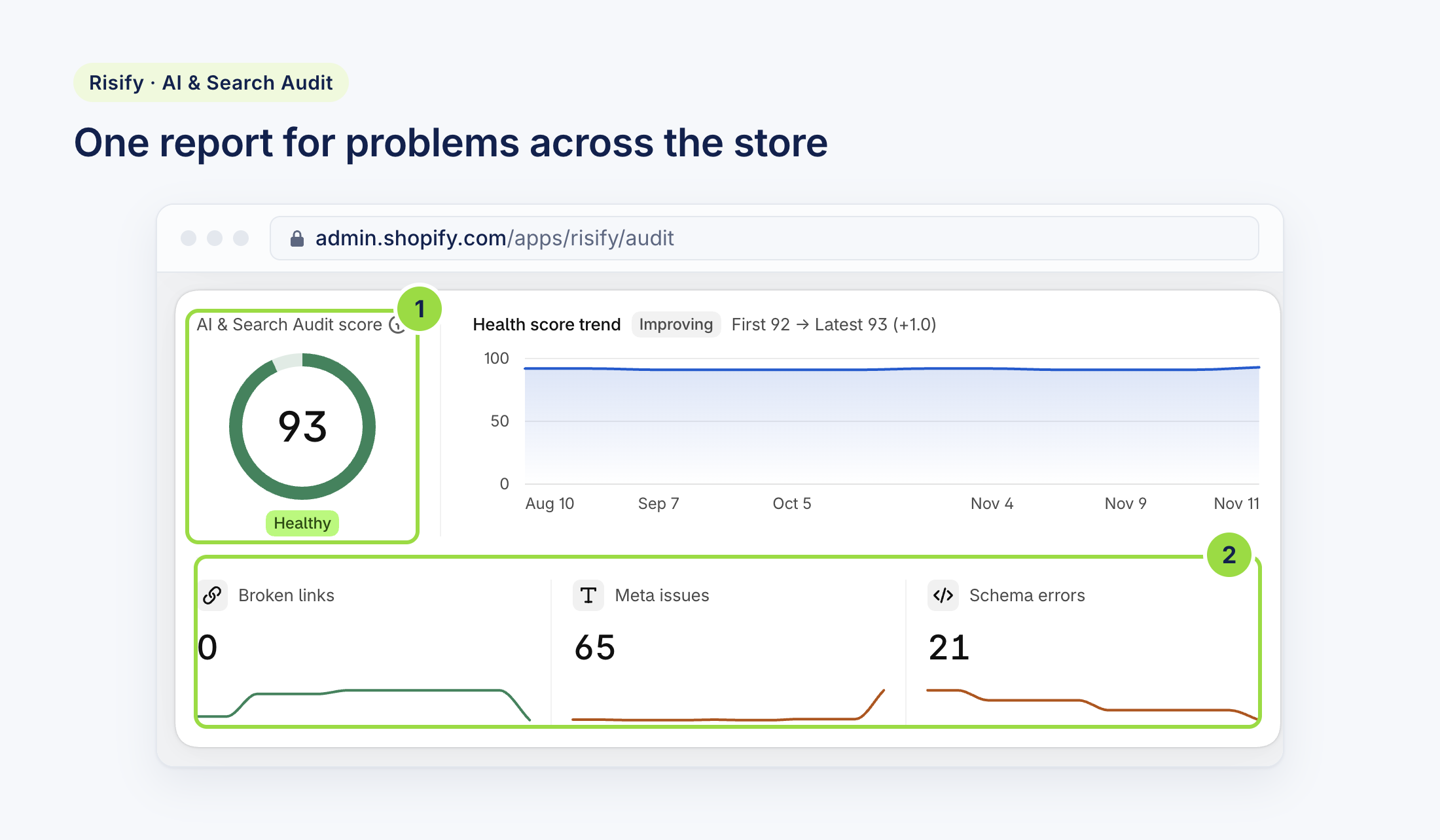
Shopify gives you the meta fields but no report on them. You cannot see at a glance which pages have missing, duplicate or overlong tags, which links are broken, or where schema has errors. On a large catalog, problems build up without anyone noticing.
6. No tracking of rankings or AI mentions
Shopify’s analytics show traffic and sales. They do not show where you rank for a keyword, and they do not show whether ChatGPT, Claude or Google AI Mode mention your store when shoppers ask about what you sell.
One thing you cannot change
Shopify’s URL format is fixed. Products live under /products/ and collections under /collections/. No app can change this, and it is not a serious problem for rankings. It is worth knowing so you do not spend time on it.
Shopify’s built-in SEO vs Shopify with an SEO and AI visibility app
| Shopify alone | Shopify with an app such as Risify | |
|---|---|---|
| Sitemaps, canonical tags, HTTPS | Yes | Yes, still handled by Shopify |
| Meta title and description fields | Yes | Yes, plus bulk editing and flags for missing, long and duplicate tags |
| Collection hierarchy | No | Signalled through breadcrumbs, collection menus and related searches |
| Breadcrumbs | Depend on the visitor’s path | Fixed path for every product and collection |
| Structured data | Whatever the theme includes | Seven schema types, with errors flagged |
| FAQs on product and collection pages | No | Yes, with FAQ schema |
| Store-wide audit | No | Yes, 100+ checkpoints, compared over time |
| Keyword rankings | No | Yes |
| AI mention tracking | No | Yes: ChatGPT, Claude, Google AI Mode |
| Product data sent to AI platforms | Yes, through Shopify’s catalog | Yes, still handled by Shopify |
When is Shopify’s built-in SEO enough?
Shopify alone can be enough when all of these are true:
- You have a small catalog, with a handful of collections.
- Most of your traffic comes from ads, social media or returning customers.
- You are not trying to rank for category searches such as “leather weekend bag”.
- You are happy to fill in meta fields by hand.
If that is your store, fill in your titles, descriptions and product details carefully and install the free Knowledge Base app. That is a reasonable setup for now.
When does a store need more?
Your store has outgrown the built-in tools when one or more of these is true:
- You have more than a few dozen collections, or collections that overlap.
- Your collection pages do not rank for the categories you sell. Why Shopify Collection Pages Don’t Rank covers the usual causes.
- Organic search is, or should be, a real source of revenue.
- You want AI tools to recommend your products, and you want to know whether they do.
- You are paying, or thinking of paying, an agency or a developer to fix structure and schema.
A five-question test
Open a product page in a private browser window, straight from a Google result, and check:
- Does the page show a full breadcrumb, such as Home, then a category, then a subcategory?
- Does the collection page link to its subcategories or to related collections?
- Does the page answer shopper questions in an FAQ section?
- Does Google’s Rich Results Test show Product, Breadcrumb and FAQ schema with no errors?
- Do you know whether AI tools name your store for your main product types?
Each “no” is a gap Shopify does not close for you. Three or more means your store has outgrown the built-in tools.
How to close the gaps without an agency
Until recently, closing these gaps meant hiring help. A developer edited the theme to add breadcrumbs and schema. An agency planned the structure and wrote the content. The result was hard to maintain, because every theme update risked breaking it.
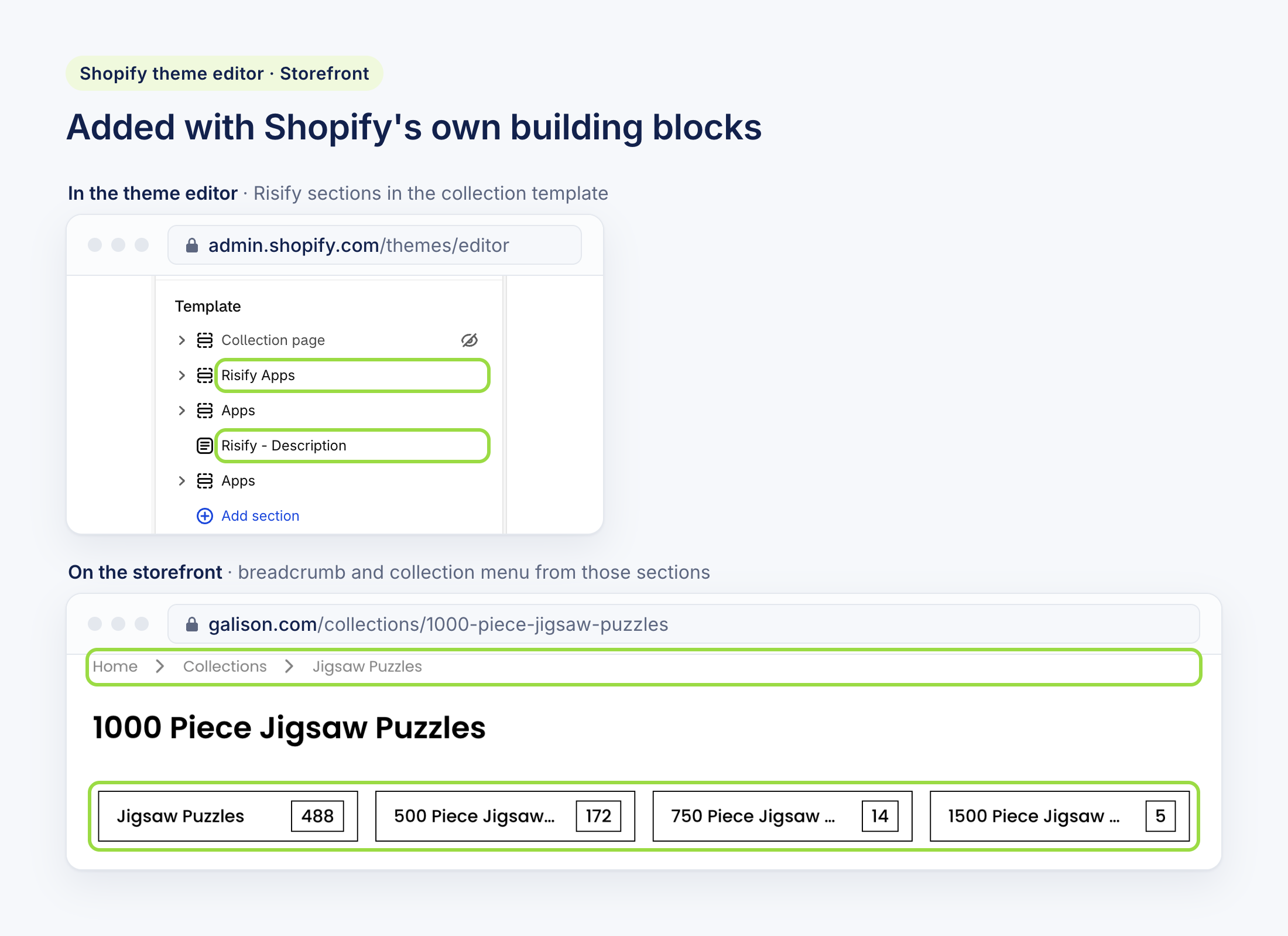
That has changed. An app can now add this layer on top of Shopify, using Shopify’s own building blocks, and a merchant or a small team can manage it from the Shopify admin. You stay in control, and you do not need SEO training to do it well.
Where Risify fits
Risify is a Shopify app that optimizes a store’s AI and search visibility by fixing its structure, content and signals, and tracks the result. It works with Shopify’s native tools and leaves what Shopify already does well alone.
It closes each gap in this guide:
- Hierarchy and breadcrumbs: Navigation gives every product and collection a fixed breadcrumb path, and adds collection menus and related searches.
- Structured data: seven schema types, including Product, Breadcrumb, FAQ and Organization.
- On-page answers: reusable FAQs for products and collections, with FAQ schema.
- Visibility into problems: an AI & Search Audit with more than 100 checkpoints, plus bulk meta tag editing.
- Tracking: keyword rankings, Search Console data and AI Visibility, which shows whether ChatGPT, Claude and Google AI Mode mention your store.
Risify is built with Shopify’s app blocks, metafields and theme extensions, with no external scripts. Your data stays in Shopify.
You are not left to work it out alone. Every plan includes expert support and a one-on-one onboarding call. On Risify Plus, the Risify team does the setup and writes FAQs for your collections and products. Our guide on how to fix Shopify SEO and AI visibility gaps shows the full process.
Risify builds the foundation search engines and AI tools need. It cannot guarantee rankings or AI recommendations, and no app can.
Conclusion
Shopify gives every store a sound technical base, and for a small store that is a fine place to start. It does not give you a catalog structure, reliable breadcrumbs, complete structured data, on-page FAQs or any view of how AI tools treat your store. Those are the things that decide whether a growing store gets found.
You can close those gaps yourself, without an agency or a developer. Risify was built for exactly that, with a team behind it when you want help. You can find Risify on the Shopify App Store.