



The best Shopify schema app for you depends on what your store is missing. If your pages already have good content and you only need the markup, a dedicated schema app does that well and cheaply. If your pages lack the things schema describes, such as FAQs, a clear breadcrumb path and a catalog structure, you need an app that builds those and marks them up.
This guide compares seven apps on the schema they add, how they handle errors and theme conflicts, and what help you get. Risify is our own app. It is not a schema-only app, and we explain below when that is an advantage and when a dedicated schema app is the better pick.
You do not need a developer for any of this. Every app on this list adds schema without code.
Key takeaways
Schema markup states facts about your pages in a format search engines and AI tools read directly.
Shopify themes usually add basic Product schema and little else, so most stores need an app.
Dedicated schema apps cover the most schema types at the lowest price.
Schema can only describe what is on the page. Missing FAQs or unclear breadcrumbs cannot be fixed with markup alone.
Always test the result, and never let two sources write the same schema.
What is schema markup, and why does a Shopify store need it?
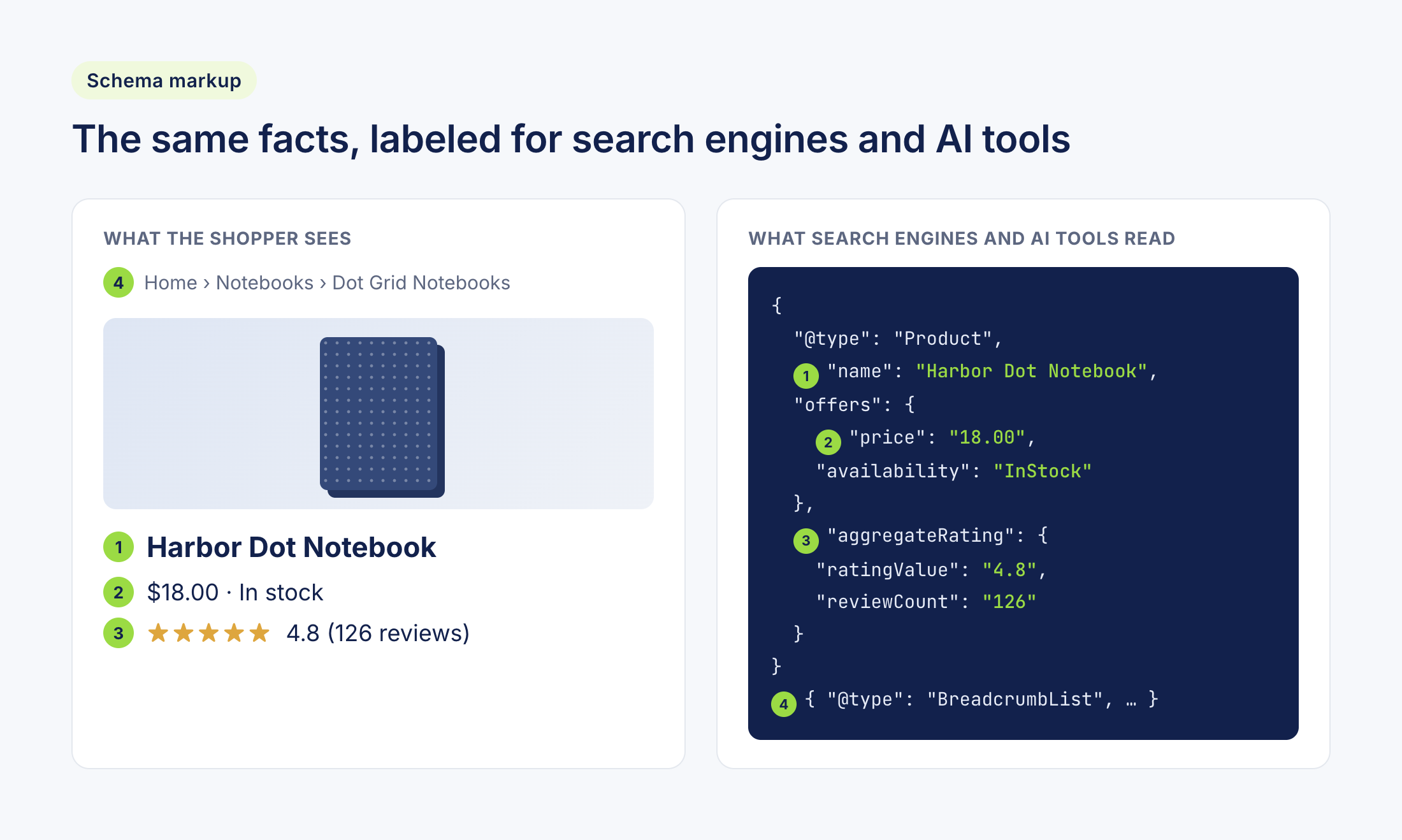
Schema markup is code, usually in a format called JSON-LD, that labels the facts on a page: this is a product, this is its price, it is in stock, these are its reviews, this is where it sits in the store. A shopper never sees it. Search engines and AI tools do.
It matters for two reasons. Google uses it for rich results, such as price, availability and star ratings under a listing. AI tools use it to read your pages accurately. Microsoft’s Fabrice Canel confirmed in 2025 that schema helps Microsoft’s language models understand content. Our guide to Shopify schema markup covers the types in detail.
Do you need a schema app if your theme has schema?
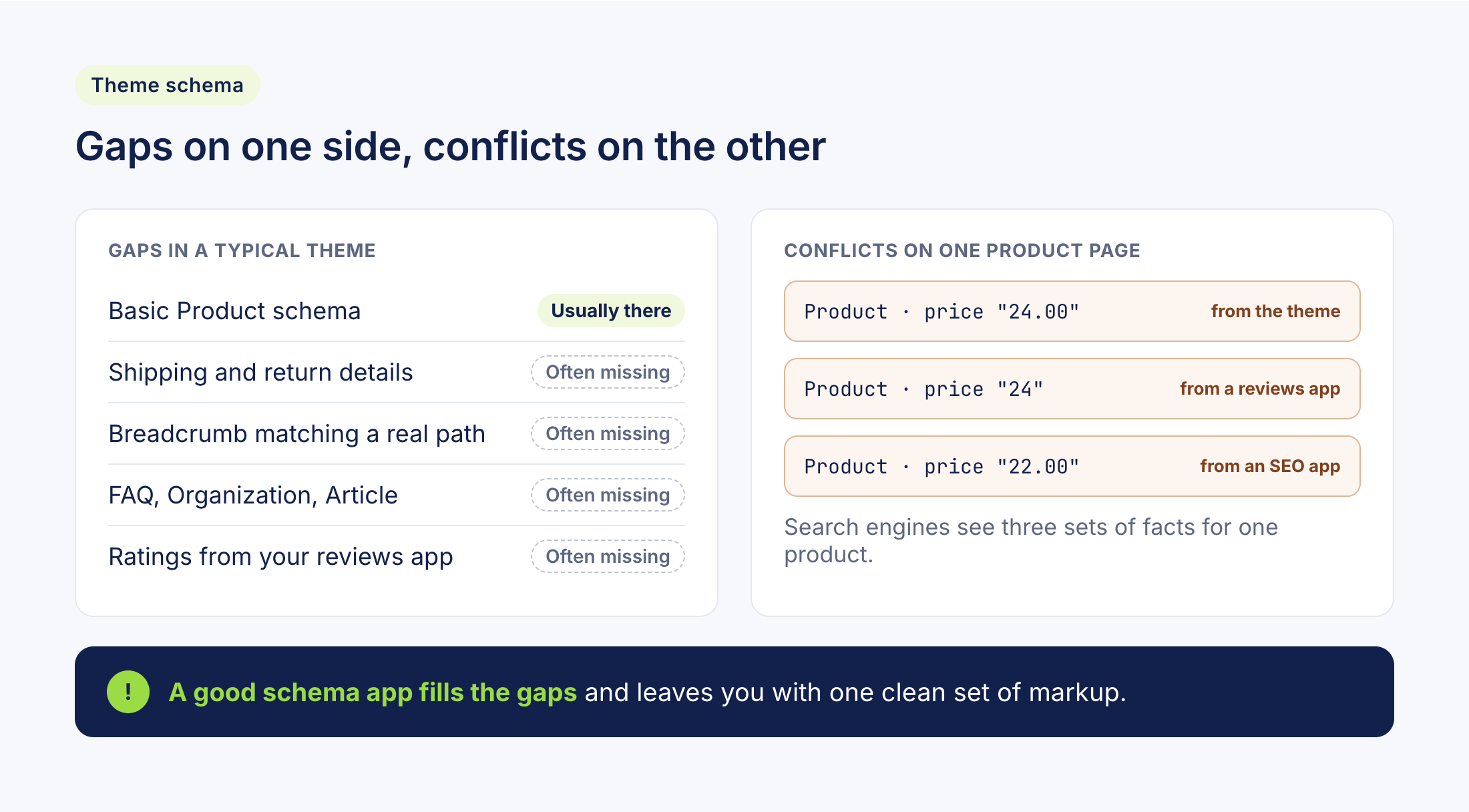
Usually, yes. Most Shopify themes output basic Product schema, and what they include depends on the theme developer. Common gaps are:
Product fields Google looks for, such as shipping and return details.
Breadcrumb schema that matches a real breadcrumb path.
FAQ, Organization and Article schema.
Review ratings from your reviews app.
The opposite problem is just as common. A theme, a reviews app and an SEO app can each add Product schema to the same page, with different values. Search engines then see conflicting facts. If your review stars have disappeared from Google, this is often the cause, as we explain in Why Shopify Review Stars Do Not Show in Google.
A good schema app fills the gaps and leaves you with one clean set of markup.
How we compared the apps
We compared on six points:
Kind of app: dedicated to schema, or schema as one part of a wider app.
Schema types the app adds.
Error handling: whether it finds and fixes errors and conflicts.
What sits behind the schema: whether the app can create the FAQs and breadcrumbs it marks up.
Help: setup calls, support and done-for-you work.
Price.
We did not compare on ratings, review counts or install counts, and we did not test the apps hands-on. Details come from each app’s Shopify App Store listing.
Shopify schema apps compared
| App | Kind of app | Schema types listed | Error handling | Creates FAQs and breadcrumbs | Help | Paid plans from |
|---|---|---|---|---|---|---|
| Risify | Full AI and search app | Product, Breadcrumb, FAQ, Article, Organization, Website, Team members | Schema errors flagged in the audit; Schema Debugger | Yes | Expert support and onboarding call; done-for-you on Plus | $145/month |
| Schema Plus | Dedicated schema app | Product, Review, Merchant Listing, FAQ, Local Business, Organization, Collection, Blog, Breadcrumbs, Video, Recipe | Fixes missing, incorrect or conflicting schema | No | 24/7 chat and a free setup call | $10.99/month |
| Ilana’s JSON-LD for SEO | Dedicated schema app | Products, reviews, blogs, breadcrumbs, homepage, FAQs, recipes, video | Structured data audit and ongoing monitoring | No | Unlimited app support | $399/year |
| Webrex | Schema and SEO app | Structured data, breadcrumb, FAQ | Lists fixing errors and warnings | Not described | Not described | See listing; free plan |
| Smart SEO | SEO toolkit | JSON-LD | Not described | No | Dedicated support on top plan | $14.99/month |
| TinySEO | Speed and SEO toolkit | JSON-LD, with shipping and returns | Site audit | No | 24/7 support | $14/month |
| StoreSEO | SEO toolkit | JSON-LD, FAQ schema, local SEO | Not described | FAQ generation | 24/7 chat support | $19.99/month |
1. Risify
Risify is a Shopify app that optimizes a store’s AI and search visibility by fixing its structure, content and signals, and tracks the result. Structured Data is one part of it. It is made by Solverhood, the team behind Analyzify.
Why schema belongs inside a wider app. Schema describes what is on the page. FAQ schema needs FAQs. Breadcrumb schema needs a breadcrumb path that makes sense. A schema-only app can mark up what exists, but on most Shopify stores those things do not exist yet: there is no FAQ feature for storefront pages, and default breadcrumbs change with the visitor’s path. Risify builds them and marks them up together.
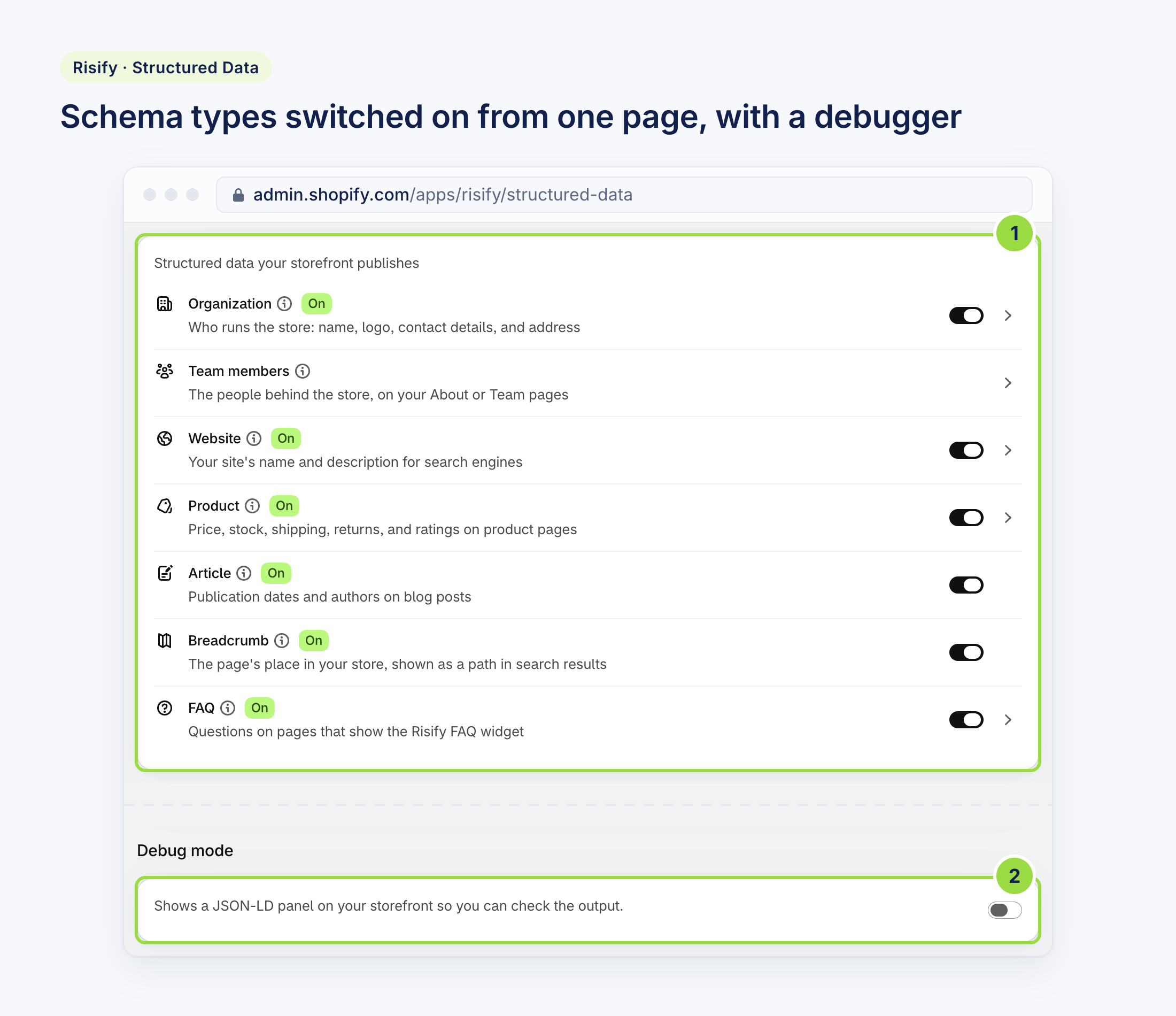
Seven schema types from one settings page: Product, Breadcrumb, FAQ, Article, Organization, Website and Team members. You switch on what you need and activate it with one app embed in your theme. No code.
FAQ schema with the FAQs. Write an FAQ once, assign it to many products and collections, and the FAQ schema follows automatically.
Breadcrumb schema with the breadcrumbs. Set a fixed path for every product and collection, so the visible breadcrumb and the schema say the same thing.
Error checking. The AI & Search Audit flags schema errors among its 100+ checkpoints, and a Schema Debugger shows the exact markup on any page.
Multi-language schema on Risify Plus.
You do not need a developer or an agency. Getting schema right used to mean theme edits. With Risify, you or your team set it up from the Shopify admin, with expert support and an onboarding call on every plan. On Risify Plus, the Risify team sets up schema for you.
You can see whether it helps. Risify tracks keyword rankings and shows whether ChatGPT, Claude and Google AI Mode mention your store, so schema work is tied to a result.
Pricing: Risify Standard is $145 a month and Risify Plus is $745 a month. There is no free plan and no free trial.
2. Schema Plus
Schema Plus is a dedicated schema app, on the App Store since 2018. Its listing describes JSON-LD for Product, Review, Merchant Listing, FAQ, Local Business and more, and says it resolves Search Console errors and removes duplicate or conflicting markup.
Plans: $10.99 a month for up to 5 products, $17.99 for up to 250 products with Organization, blog, collection and breadcrumb schema, and $28.99 for unlimited products with merchant listings, shipping and return policy, local business, video, recipe and FAQ schema. Every plan includes 24/7 chat and a free setup call.
3. Ilana’s JSON-LD for SEO
Ilana’s JSON-LD for SEO is a dedicated schema app, on the App Store since 2015. Its listing describes schema for products, reviews, blogs, breadcrumbs, FAQs, recipes and video, support for more than 20 review apps, and the fields Google Merchant Center needs. Markup updates automatically when you change themes.
Plan: $399 a year, with a structured data audit, ongoing monitoring of rich results and unlimited app support.
4. Webrex
Webrex is listed as Webrex: AI SEO, Schema JSON-LD. Its App Store card describes structured data, rich snippets, breadcrumb and FAQ schema markup, and fixing errors and warnings. It has a free plan.
5. Smart SEO, TinySEO and StoreSEO
These three are SEO toolkits that include schema as one feature.
Smart SEO lists JSON-LD structured data on its paid plans, from $14.99 a month.
TinySEO lists JSON-LD with return policy and shipping details from $14 a month, and extended JSON-LD on its top plan.
StoreSEO lists JSON-LD, FAQ schema and local SEO schema, from $19.99 a month.
How do you test an app’s schema?
Test before and after you install anything. It takes five minutes.
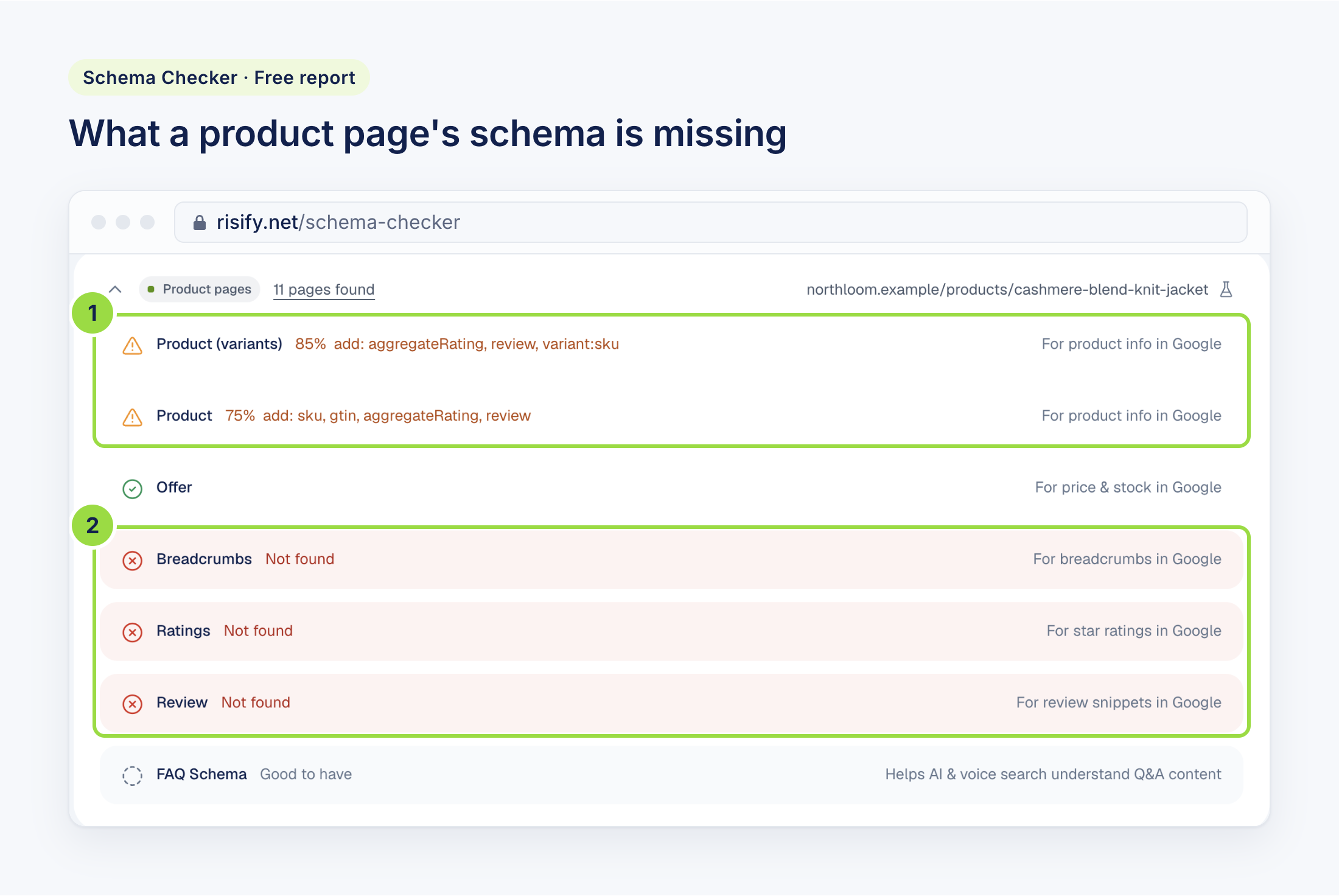
Run our free Schema Checker. Enter a page and it shows which schema it finds and what is missing. It works on any store, whichever app you use.
Run Google’s Rich Results Test on a product page, a collection page and a blog post. It shows which rich results the page qualifies for, with errors and warnings.
Count the Product blocks. If the test shows two Product items on one page, two sources are writing schema. Turn one off.
Check the values. Price, availability and rating in the markup should match what the page shows.
Watch Search Console over the next weeks. Its enhancement reports show errors across the whole store.
Warnings are common and usually harmless. Errors block rich results and should be fixed.
Schema alone or the full foundation?
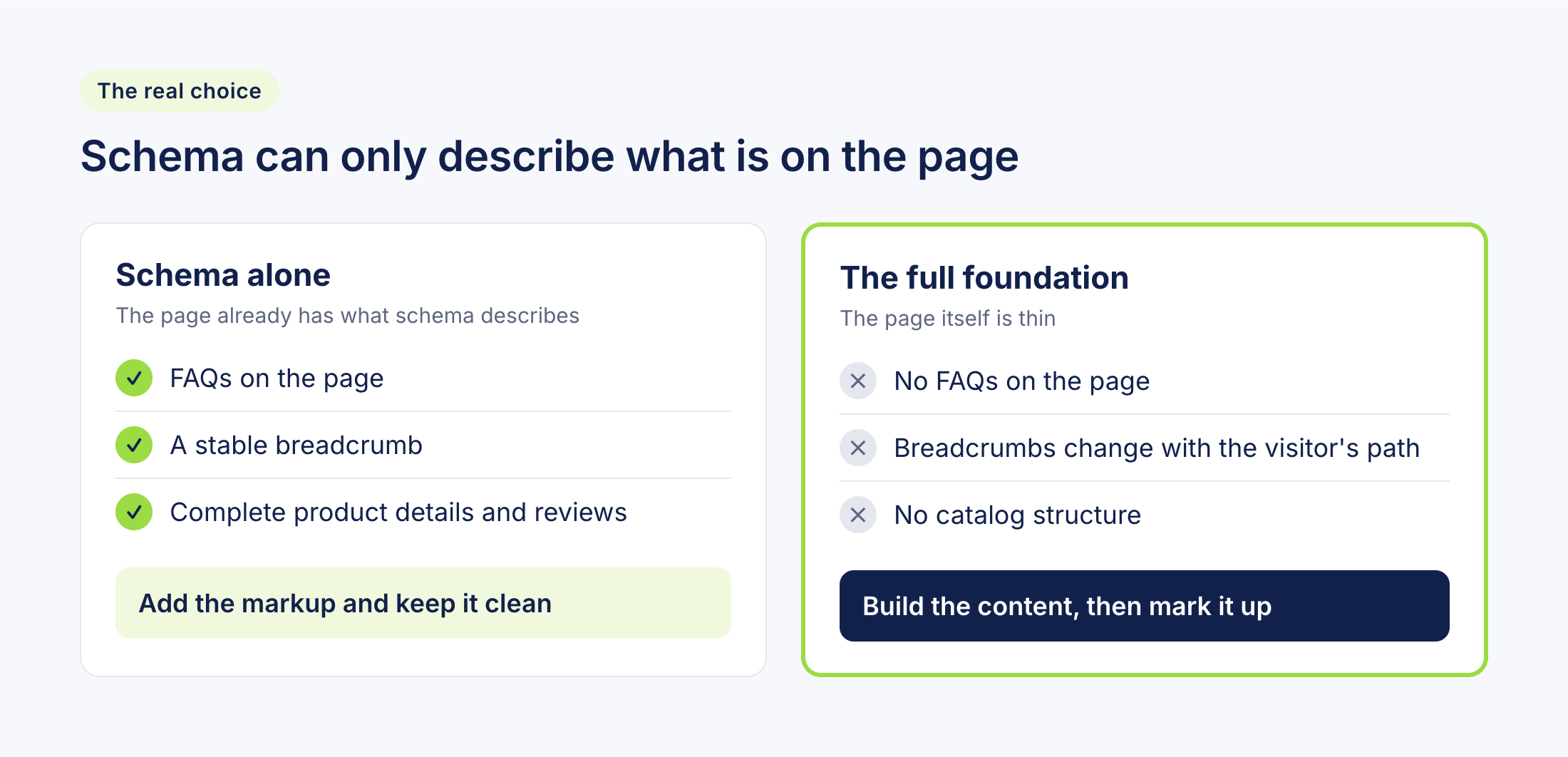
This is the real choice in this comparison.
Schema alone makes sense when your pages already have what schema describes. You have FAQs on your pages, a stable breadcrumb, complete product details and reviews. You need the markup added and kept clean. A dedicated schema app does exactly that.
The full foundation makes sense when the pages themselves are thin. No amount of markup creates an FAQ that is not there or a catalog structure Shopify never gave you. How Structured Data Affects AI Visibility explains how the pieces fit.
Stores often end up with a schema app, an FAQ app, a breadcrumb app and an SEO toolkit, each writing markup. That is where duplicates come from. One app that handles structure, content and schema together avoids it.
How to choose
You only need schema, with wide coverage and low cost. Choose Schema Plus or Ilana’s JSON-LD for SEO.
Review stars and Merchant Center are your priority. Look at Ilana’s JSON-LD for SEO or Schema Plus, and check that your review app is supported.
You want to try schema for free. Look at Webrex.
You already use an SEO toolkit. Check whether its schema covers what you need before adding another app.
Your pages lack FAQs, fixed breadcrumbs or a clear structure. Choose Risify, which builds them and marks them up.
You want schema set up for you, with the rest of your AI and search foundation. Choose Risify Plus.
Conclusion
Schema apps come in three kinds. Dedicated schema apps give the widest coverage for the lowest price. SEO toolkits include basic schema next to other features. A full foundation app treats schema as one layer and builds the content and structure beneath it.
If schema is your only gap, pick a dedicated app. If your store needs the FAQs, breadcrumbs and structure that schema is meant to describe, Risify gives you all of it in one place, with experts to set it up. You can find Risify on the Shopify App Store.