


SEO for a large Shopify catalog starts with structure. When a store has thousands of products, the main problem is rarely a single meta tag. The problem is that search engines and AI tools cannot see how the catalog fits together: which collections sit under which, how products relate, and which pages matter most.
This guide explains why large catalogs struggle, what to fix first, and how to do the work at scale. It is written for Shopify stores with roughly a thousand products or more, though the same steps help smaller stores that are growing.
Key takeaways
- Large catalogs struggle because of structure: flat collections, weak internal links and inconsistent breadcrumbs.
- Shopify does not give collections a hierarchy by default. You have to create the signals yourself.
- Fix collection pages before product pages. Collections are where category searches land.
- Bulk tools and templates matter, because manual page-by-page work does not scale.
- Bad.no, a store with more than 30,000 products, grew organic sessions by 132% over 8 quarters with a structure-first approach.
Why do large Shopify catalogs struggle to rank?
Large catalogs struggle because problems that are small on a 50-product store multiply with every product and collection you add. Five problems show up most often.
Collections have no hierarchy
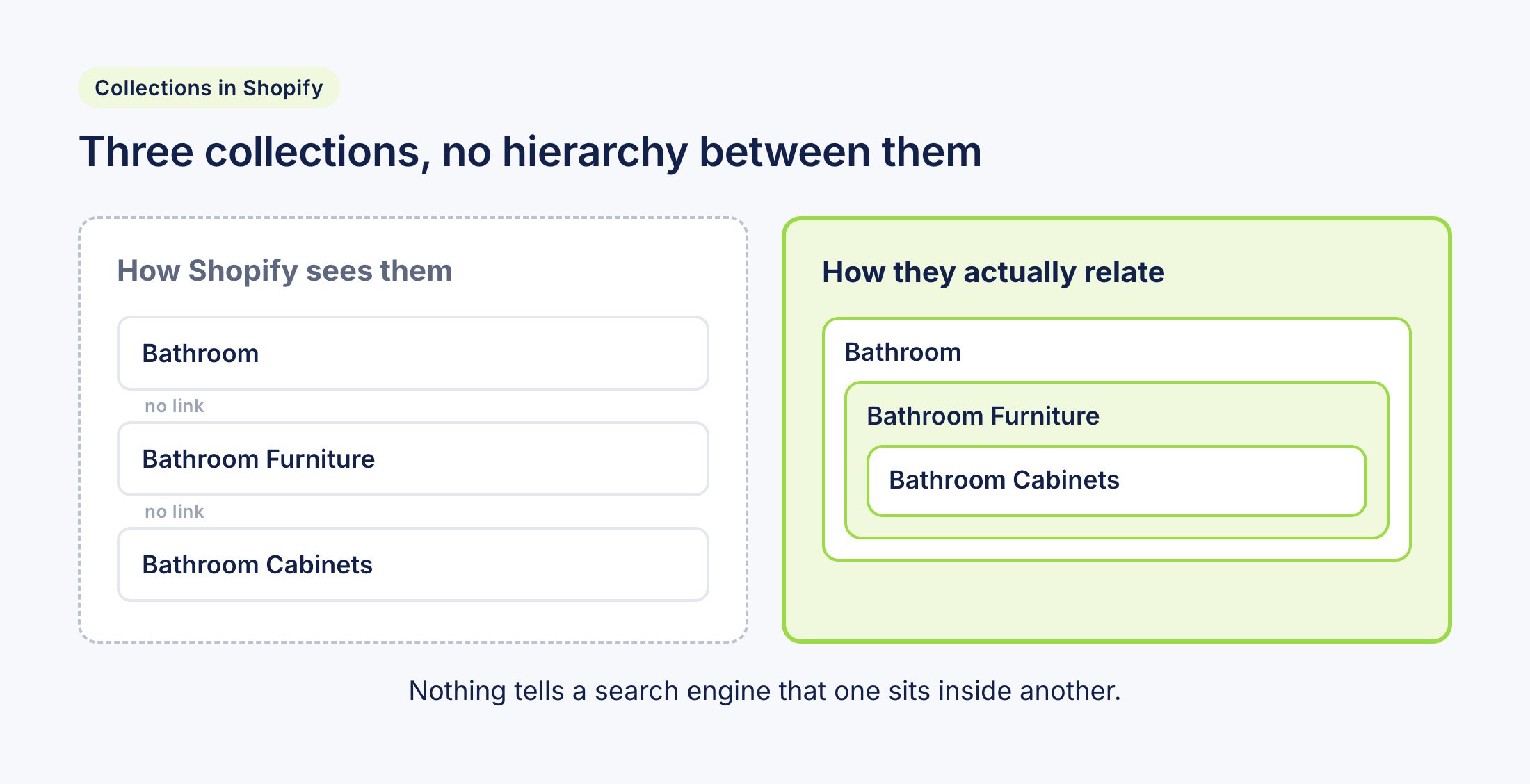
Shopify treats every collection as a separate, flat page. “Bathroom”, “Bathroom Furniture” and “Bathroom Cabinets” are three unrelated collections as far as Shopify is concerned. Nothing tells a search engine that one sits inside another.
On a small store, a search engine can work it out. On a store with hundreds of collections, it often cannot.
Breadcrumbs change with the visitor’s path
Shopify’s default breadcrumbs follow the path a visitor took. The same product can show different breadcrumbs depending on which collection the visitor came from, and none at all when someone lands on it directly from search. We explain this in Shopify Breadcrumbs: How to Check and Fix.
For a large catalog, this means thousands of products with no stable place in the store.
Deep pages are under-linked
Most internal links on a Shopify store come from the main menu and from collection grids. A main menu can hold a few dozen links. A store with 400 collections leaves most of them several clicks deep or linked from nowhere useful.
Pages with few internal links are crawled less often and carry less weight.
Collections compete with each other
Large catalogs grow overlapping collections: “Black Dresses”, “Dresses in Black”, “Evening Dresses Black”. When two collections target the same search, they split the signals and neither ranks well. Why Shopify Collection Pages Don’t Rank covers how to diagnose this.
Content is thin and repeated
With thousands of products, descriptions are often supplier text, and collection pages are a title and a grid. Meta titles follow the same default pattern everywhere. Search engines and AI tools find little that explains what a category is or how products differ.
What should you fix first on a large catalog?
Fix structure first, then collection pages, then product pages. This order puts the effort where it reaches the most pages.
1. Map your collection hierarchy
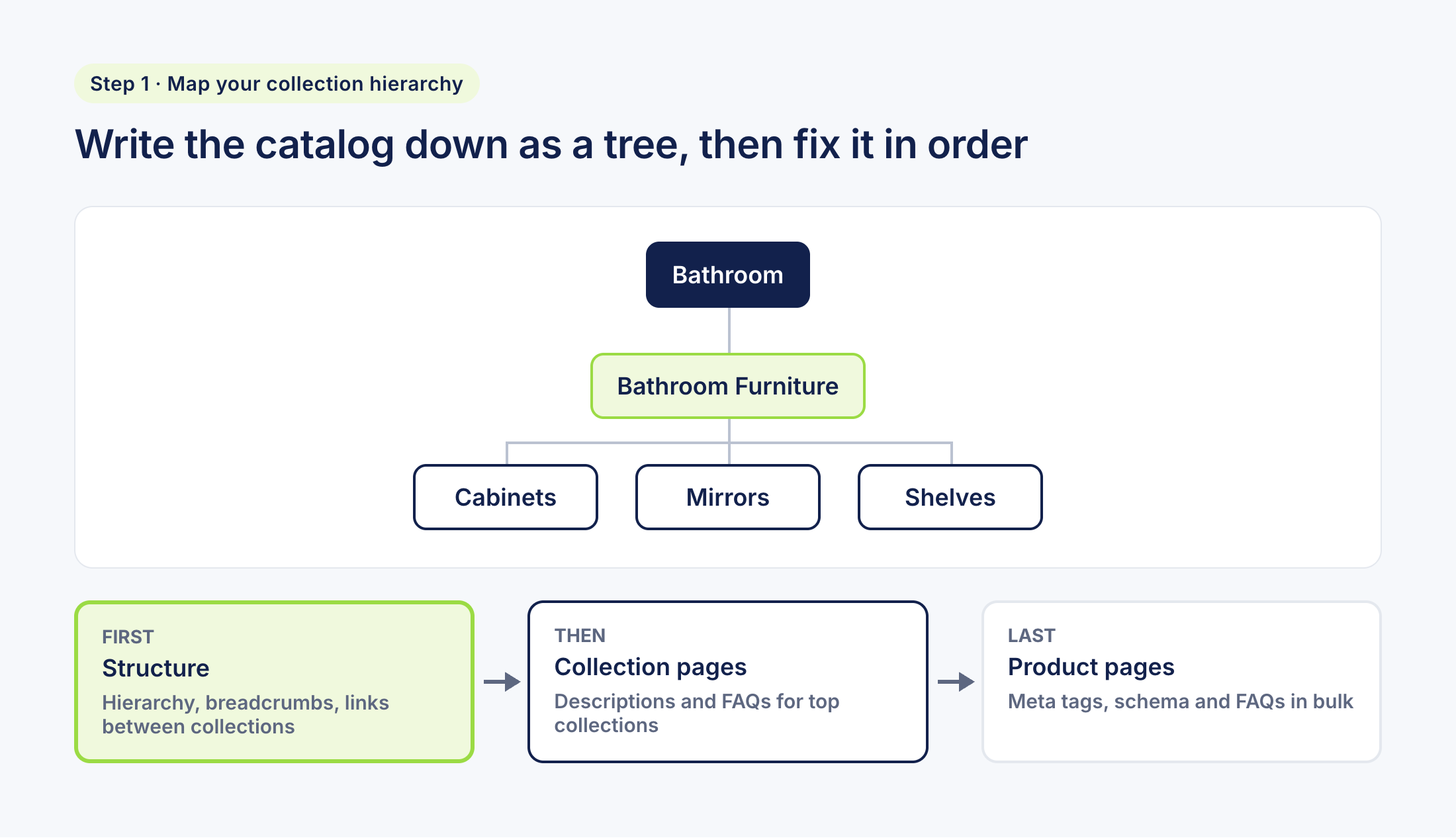
Write down your catalog as a tree: main categories, subcategories and the collections under each. Most stores have never done this, because Shopify does not ask for it.
The map shows gaps, duplicates and collections that belong nowhere. Merge or redirect the duplicates before you do anything else.
2. Give every page a fixed breadcrumb path
Each product and collection should have one breadcrumb path that matches your hierarchy and does not change with the visitor’s route. Add Breadcrumb schema that matches the visible breadcrumb.
This single change tells search engines and AI tools where every page sits.
3. Link collections to each other
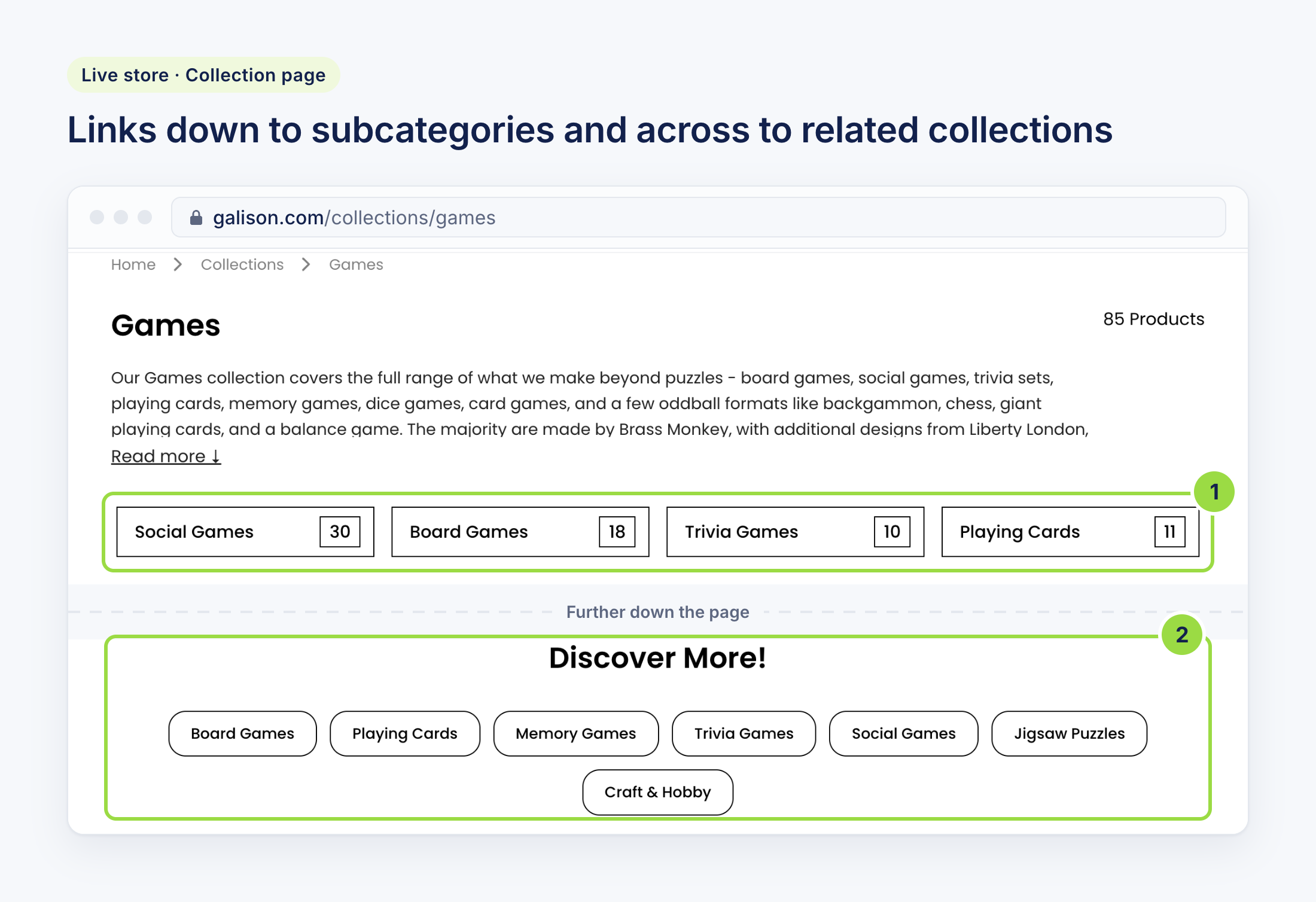
Collection pages should link to their subcategories, their parent and related collections. Two patterns work well:
- A collection menu at the top of a collection page that links to its subcategories. A shopper on “Bathroom Furniture” sees “Cabinets”, “Mirrors” and “Shelves”.
- Related searches that link to nearby collections a shopper may want next.
These links help shoppers narrow down without going back to the main menu. They also spread internal links to deep pages. How to Build Better Collection Pages in Shopify shows how this looks on a page.
4. Make collection pages explain the category
Add a short description that says what the category is, who it is for and how to choose. Add FAQs that answer the questions shoppers ask before buying in that category.
Start with your top collections by revenue or search demand. Twenty strong collection pages do more than two thousand edited product pages.
5. Fix product pages in bulk
Now move to products. Work in bulk and by template:
- Meta titles and descriptions: find missing, duplicate and overlong tags and fix them in batches.
- Product schema: make sure price, availability, shipping and returns are present and valid.
- Product FAQs: assign reusable FAQs by product type, so one set of answers covers hundreds of products.
6. Audit on a schedule
Large catalogs change every week. Products go out of stock, collections are added, links break. Run an audit regularly and compare it with the last one, so you see new problems before they spread.
Does catalog structure matter for AI tools too?
Yes. AI tools that read the open web use the same signals as search engines to work out how your products and categories relate: breadcrumbs, internal links and structured data. A shopper who asks an AI tool for a product type is asking a category question, and a store with clear categories is easier to match to it.
The structure work in this guide therefore serves both search and AI visibility. You do not need a separate project for each.
A real example: Bad.no
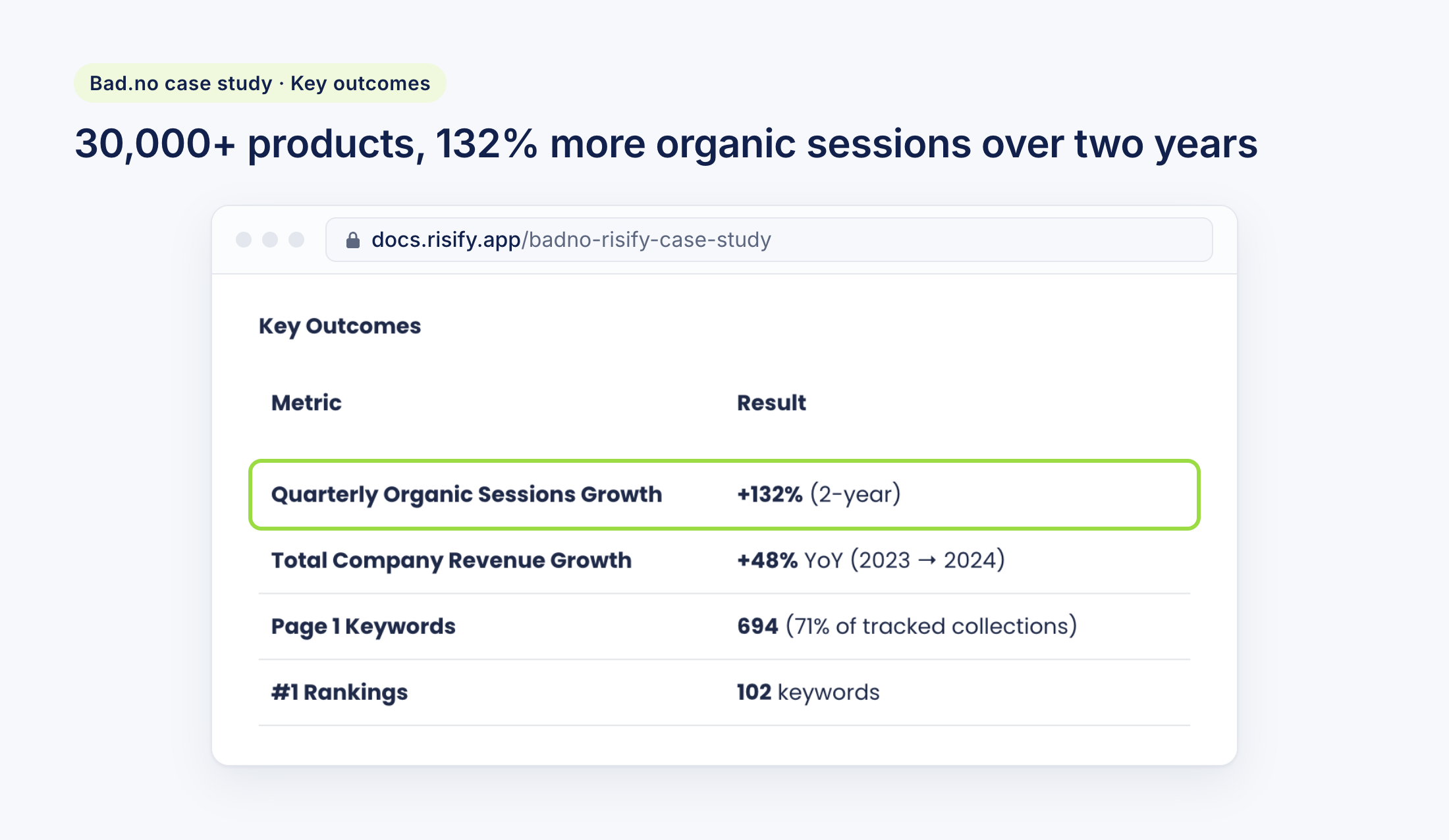
Bad.no is a Norwegian bathroom retailer with more than 30,000 products on Shopify. A catalog of that size has every problem described above: deep categories, many overlapping collections and products that belong in several places.
Bad.no took a structure-first approach with Risify, building a deep catalog structure so shoppers and search engines could follow it. Over 8 quarters, Bad.no’s organic sessions grew by 132% and its organic revenue grew by 257%.
Results depend on the store, the market and the work done, and no app can promise the same outcome. You can read the details in the Bad.no case study.
How Risify covers large catalogs
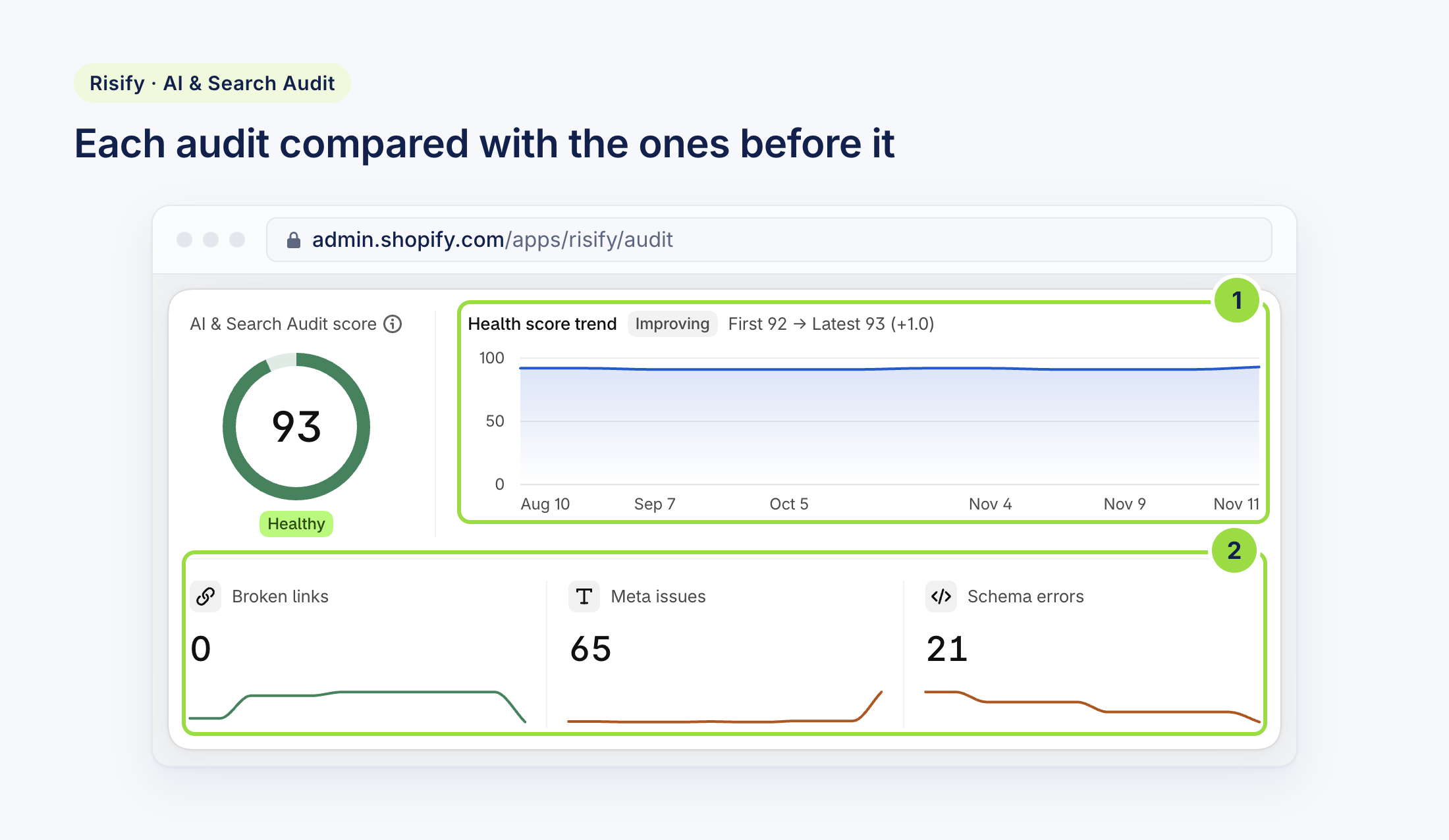
Risify is a Shopify app that optimizes a store’s AI and search visibility by fixing its structure, content and signals, and tracks the result. Its features match the steps above.
- Navigation. Set fixed breadcrumb paths for products and collections, add collection menus (called Similar in the app) and add related searches (called Discover). All three are stored in Shopify’s own metafields.
- Structured Data. Seven schema types, including Product, Breadcrumb and FAQ, generated across the catalog.
- FAQs. Write an FAQ once and assign it to many products and collections. A coverage view shows which pages still have none.
- Meta Tags. Edit in bulk, with flags for missing, long and duplicate tags.
- Risify AI. Generate FAQs, meta tags and descriptions that follow your brand instructions. Standard includes 50 AI credits a month and Plus includes 500.
- AI & Search Audit. More than 100 checkpoints, covering broken links, meta issues, page speed and schema errors, with comparison against earlier audits.
- AI & Search Visibility. Track keyword rankings and see whether ChatGPT, Claude and Google AI Mode mention your store.
For large catalogs, the work itself is often the obstacle. On Risify Plus, the Risify team handles onboarding, schema setup and catalog integration, and provides full FAQ coverage for collections and products. Plus also tracks up to 1,000 keywords across 5 domains and includes 100 audits a month.
Risify does not compress images or rewrite your theme. If speed problems come from large images or heavy scripts, you will need to handle those separately.
Large catalog SEO checklist
Use this list to check where your store stands.
- The catalog is mapped as a hierarchy, with no duplicate collections.
- Every product and collection has one fixed breadcrumb path.
- Breadcrumb schema matches the visible breadcrumb.
- Collection pages link to their subcategories and related collections.
- Top collections have a description and FAQs.
- No two collections target the same search.
- Meta titles and descriptions are unique and complete.
- Product schema is valid, with no duplicates from the theme or another app.
- An audit runs regularly and is compared with the previous one.
The AI search readiness checklist goes deeper on the schema and content items.
Conclusion
On a large Shopify catalog, structure decides how much of your store search engines and AI tools can understand. Map the hierarchy, give every page a fixed place, link collections to each other, and make collection pages explain their category. Then fix product pages in bulk and audit on a schedule.
This is steady work, and bulk tools make it realistic. Risify was built for exactly this kind of catalog: its price does not rise with product count, every plan includes expert support, and on Risify Plus the team does the setup for you. You can find Risify on the Shopify App Store.